Having trouble unblocking Amazon Prime Video at work, on vacation, or on public wifi? The Amazon Prime VPN error shows a warning telling you to disable your VPN. This leaves you stuck if you need to access a regional exclusive title from your home library while traveling or on a restrictive network.
Not all VPNs can access Prime Video from anywhere. Many are too slow or have already been blocked. But the good news is I found a few VPNs that know how to stay ahead of Amazon’s VPN blocks. All my recommendations have the servers and privacy features you need, including encryption, a kill switch, and obfuscated VPN servers. This lets you connect from abroad or on networks that block VPNs, perfect if you want to catch up on a stream at work.
Keep reading to learn which VPNs work with Prime Video without triggering the proxy error, how to fix the Amazon Prime VPN error and other common errors, and what to do if Amazon Prime incorrectly thinks you are using a VPN.
The best VPNs for Amazon Prime Video:
- NordVPN: The best VPN for Amazon Prime. Fast NordLynx speeds. Strong privacy features. Reliable Prime Video access without triggering the proxy error. 30-day money-back guarantee.
- Surfshark: The best budget VPN for Amazon Prime. Fast WireGuard speeds, unlimited devices, and strong privacy make this a fantastic all-rounder for families.
- Proton VPN: A privacy-focused option with WireGuard, VPN Accelerator, split tunneling, and strong streaming performance. Ideal if you also want to torrent using port forwarding.
- ExpressVPN: A reliable premium VPN with fast Lightway connections and MediaStreamer Smart DNS for TVs and other devices.
- CyberGhost: Best for beginners who want labeled servers for Prime Video. Gives you access to Prime Video in 26 different regions.
- IPVanish: Ideal for families and users with lots of devices. Unlimited simultaneous connections and plenty of servers to switch to if Amazon blocks one.
Want more info? You can learn more about each VPN by reading the detailed summaries later in this guide. I also list the metrics I used to test and rank these VPNs in the methodology section.
How to fix the Amazon Prime Video proxy error
The Amazon Prime Video proxy and VPN error messages look like this:
- “Your device’s internet connection is using an HTTP proxy which prevents playing your video. Please close or disable any proxy programs and try again.”
- “Your device is connected to the internet using a VPN or proxy service. Please disable it and try again. For more help, go to primevideo.com/vpn.”
These errors can still occur even if you’re using a VPN proven to work with Amazon Prime Video. If that happens, don’t panic; it probably means Amazon has blocked that specific VPN IP address, stored location data from a previous session is causing a conflict, or another setting is interfering with the VPN. The good news is all those issues are fixable; work through the troubleshooting steps below, and you’ll be streaming again in no time.
Quick fixes for the Amazon Prime VPN error:
- Clear your cookies and cache. Stored location data can conflict with your new VPN location. Android users can clear the Prime Video app cache in settings. On iPhone or iPad, delete and reinstall the app to completely clear its stored data.
- Use Prime Video in your browser instead of the standalone app. Mobile apps can use additional location signals such as GPS, which may conflict with your VPN location.
- Reconnect to the same VPN location. Premium VPNs often have a pool of IP addresses in each location. When you disconnect and reconnect, you may be assigned a different IP that has not yet been blocked by Prime Video.
- Try another server in the same country. Some VPN locations use the same IP address each time you reconnect to a particular server. If that IP has been blocked, test another server in the region you need until you find one that works.
- Switch VPN protocol. Try WireGuard, OpenVPN, or Automatic. If your VPN offers a custom protocol like NordLynx, Lightway, or Hydra, test that first.
- Check for IP and DNS leaks. If your real IP or ISP DNS appears in tests, Amazon may detect your true location. I already tested all the VPNs in this guide and found no leaks, but checking on your own machine can help rule out IP, DNS, or WebRTC leaks as the problem.
- Update the VPN app. An older app may have outdated protocols or server information that causes issues when you try to stream Amazon Prime.
- Check your Amazon account region. Your account country should match the catalog you are trying to access. This is why a VPN works well to regain access to your home region, but requires a bit more work from you if you are deliberately trying to access a new region.
- Log out and back into Prime Video. If you have already set your account to the region you want, log out of Prime Video with the VPN connected, clear your cookies (or open Prime in incognito), confirm the VPN is still connected, then log back in to the website.
- Contact VPN support. All my recommendations have live chat support that will be happy to help you access Prime or any other platform.
Advanced fix: If the error refuses to go away, it is a good idea to flush your DNS cache. This clears old DNS data that may still contain your previous location information.
- Windows: ipconfig /flushdns
- macOS: sudo dscacheutil -flushcache; sudo killall -HUP mDNSResponder
Make sure your browser and operating system are fully updated, then restart your device before reconnecting to the VPN to check whether clearing the DNS cache has resolved the conflict and allowed Prime Video to work.
Tried all of the above and having no luck? Your VPN might not be up to bypassing Prime Video’s VPN detection measures. Switching to one of our tried-and-tested providers may be the fastest solution.
Amazon Prime Video error codes
Getting a different Amazon Prime Video error? I have listed the main error codes you may encounter below so you know what they mean and whether they’re related to your VPN.
- Amazon Prime error code 1044: Usually means Amazon has detected a VPN or proxy connection. Try reconnecting, switching servers, and clearing your cookies and cache.
- Amazon Prime error 1042: This code comes with the message “HTTP Proxy Not Supported. Your device’s Internet connection is using an HTTP proxy which prevents playing your video.” Again, try reconnecting, switching servers, and clearing your cookies and cache.
- Amazon Prime error code 7035: A payment or order error rather than a VPN-specific error. If you see this code, check your payment method, 1-Click settings, and digital orders.
Prime Video is constantly buffering
If Prime Video loads while connected to your VPN but keeps buffering, you are already halfway there. The VPN is working, but the extra encryption and routing needed to protect your privacy and spoof your location are slowing your connection down (as all VPNs do).
Amazon recommends at least 5 Mbps for HD streaming. And you’ll need an internet connection with about 20% to 30% more speed than that to cover for the VPN slowdown. If your underlying internet is too slow because you are using mobile data, have very slow broadband, or are connected to a slow wifi hotspot on a bus or in a mall, you may need to switch to a different connection.
If you think your internet is fast enough, check that you are still above 5 Mbps while connected to the VPN using an online speed test such as Ookla. Then try another VPN server, switch to a faster protocol, and pause any large downloads if you are torrenting. Restarting your streaming device and router can also help clear up connection issues.
Amazon Prime thinks I have a VPN, but I don’t
If this happens, check which tools and extensions are running in the background. If you have any older VPNs or proxy extensions installed in your browser, remove or pause them. Also pause any privacy extensions that might be causing a conflict.
Browser extensions, antivirus web protection features, or even a corporate security tool running in the background could be to blame. In addition, some antivirus suites, like TotalAV and McAfee, bundle their own VPN, which, if enabled, could be blocking your new VPN from working as expected.
Another quick fix is to restart your router. If Amazon has incorrectly classified your home IP as a VPN, switching off your router, waiting ten minutes, and switching it back on could be enough to force your ISP to assign you a new one. If that doesn’t work, and you are convinced your IP address is to blame, contact your ISP to let them know you are experiencing issues.
Still blocked? I recommend testing Prime with and without the VPN on another connection, such as your phone’s mobile hotspot. If Prime Video works, this tells you the problem is caused by the internet connection rather than your Amazon account, device settings, or VPN.
At this point, you will need to contact your ISP to lodge a complaint. In the meantime, you can use a VPN to hide your IP address, which should get Prime Video running as long as you stick to a recommended provider.
Best VPNs for Amazon Prime Video: My top picks
I tested more than 20 market-leading consumer VPN services to find the very best VPNs for Amazon Prime Video.
1. NordVPN
NordVPN is my number one VPN for Prime Video. This veteran provider came out ahead in my tests for several reasons. First, it has more than 8,400 servers in 225+ locations, which is a truly staggering number. I’m not saying all those servers will work to access a regional Prime Video catalog, but it certainly helps to make the VPN more versatile and useful. It also gives people worldwide plenty of opportunities to regain access to their usual catalog on vacation or at work. The VPN also offers a 30-day money-back guarantee, so you can test it or compare it with any other VPN on this list risk-free.
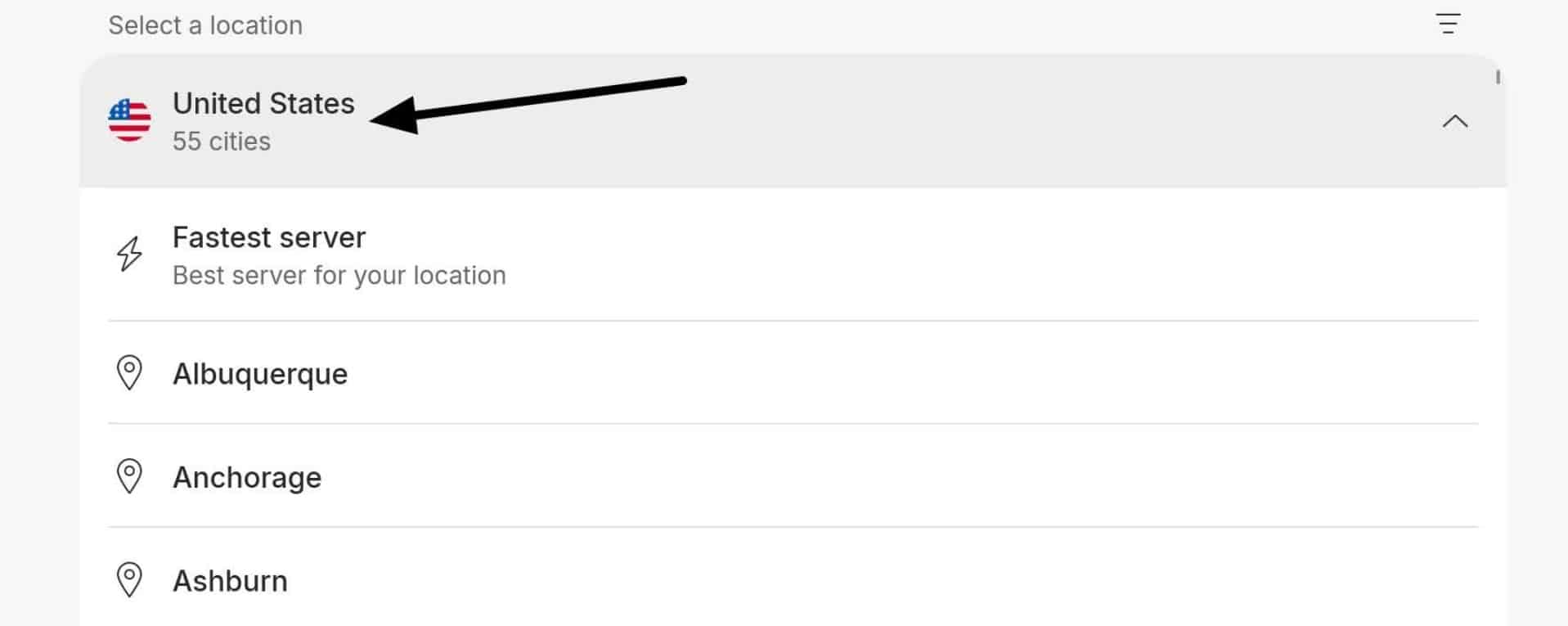
NordVPN has servers in 55+ US cities, giving you plenty of options to stream Prime Video.
In my testing, NordVPN accessed Prime Video UK and Prime Video USA from Canada without triggering the proxy error. Its large network means you have plenty of options if Amazon’s proxy-spotting systems suddenly block a server. If this happens, reconnect to the same location to trigger a fresh IP, or switch to another server in the same country until you find one that works.
NordVPN also includes SmartPlay, which works automatically alongside the VPN connection to help with streaming access. This is different from NordVPN’s standalone SmartDNS service, which helps you access Amazon Prime USA on devices that won’t let you install the VPN app directly (smart TVs, consoles, set-top streaming boxes, some IoT devices, etc). SmartPlay combines VPN encryption with automatic Smart DNS routing to help you access streaming services without triggering proxy errors.
I tested NordVPN using its proprietary NordLynx protocol and found it offered superb speeds and reliability while streaming shows in HD. NordVPN also offers features to help you connect at work, in school, or on public Wi-Fi networks that block VPN connections. Its Obfuscated Servers are now powered by NordWhisper on most platforms, helping the VPN punch through restrictive local network filters and firewalls.
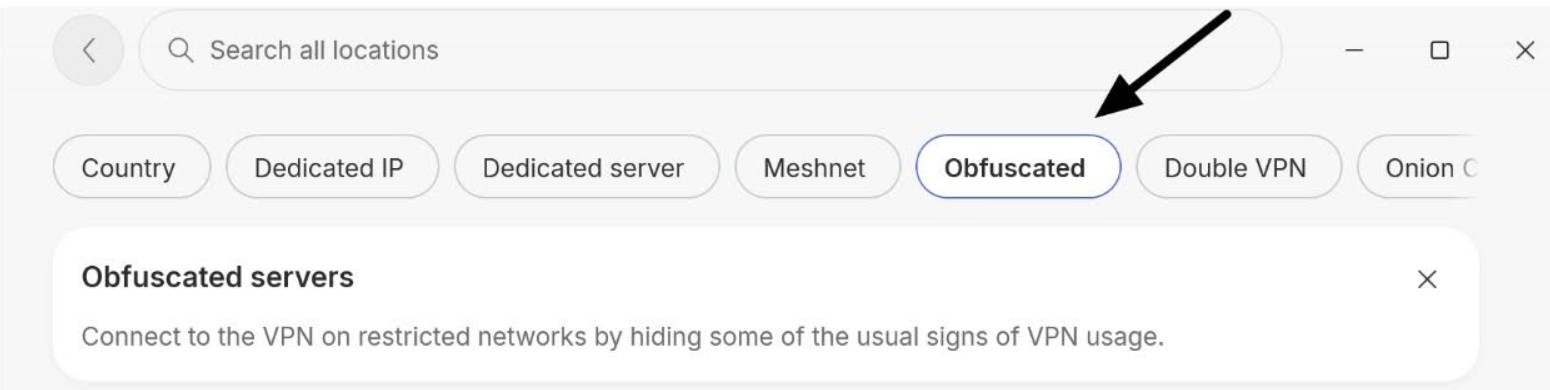
In terms of privacy, NordVPN is excellent. You get a kill switch, DNS and IPv6 leak protection, split tunneling, RAM-only servers, and an independently audited no-logs policy. This makes it reliable for watching Prime or Netflix at work, using public wifi safely against hackers, and preventing your ISP from seeing the websites and services you access.
Nord has apps for Windows, macOS, Linux, Android, iOS, Apple TV, and Firestick. You can use it on up to 10 devices simultaneously, and 24/7 live chat is available on its website to ask questions or get help setting it up.
Pros
- Works reliably with Amazon Prime Video
- 8,400+ servers in 225+ locations
- Fast NordLynx protocol for HD and 4K streaming
- SmartPlay helps with streaming access
- Obfuscated servers and NordWhisper for restrictive networks
- Independently audited no-logs policy
Cons
- No port forwarding
BEST VPN FOR AMAZON PRIME:NordVPN gave me the best overall combination of Prime Video access, fast speeds, privacy, and a wide choice of server locations. It is also a highly affordable VPN with 10 simultaneous connections, which is usually enough for most tech-heads or even families who need VPN protection on various devices. You can test it risk-free using the 30-day money-back guarantee.
2. Surfshark
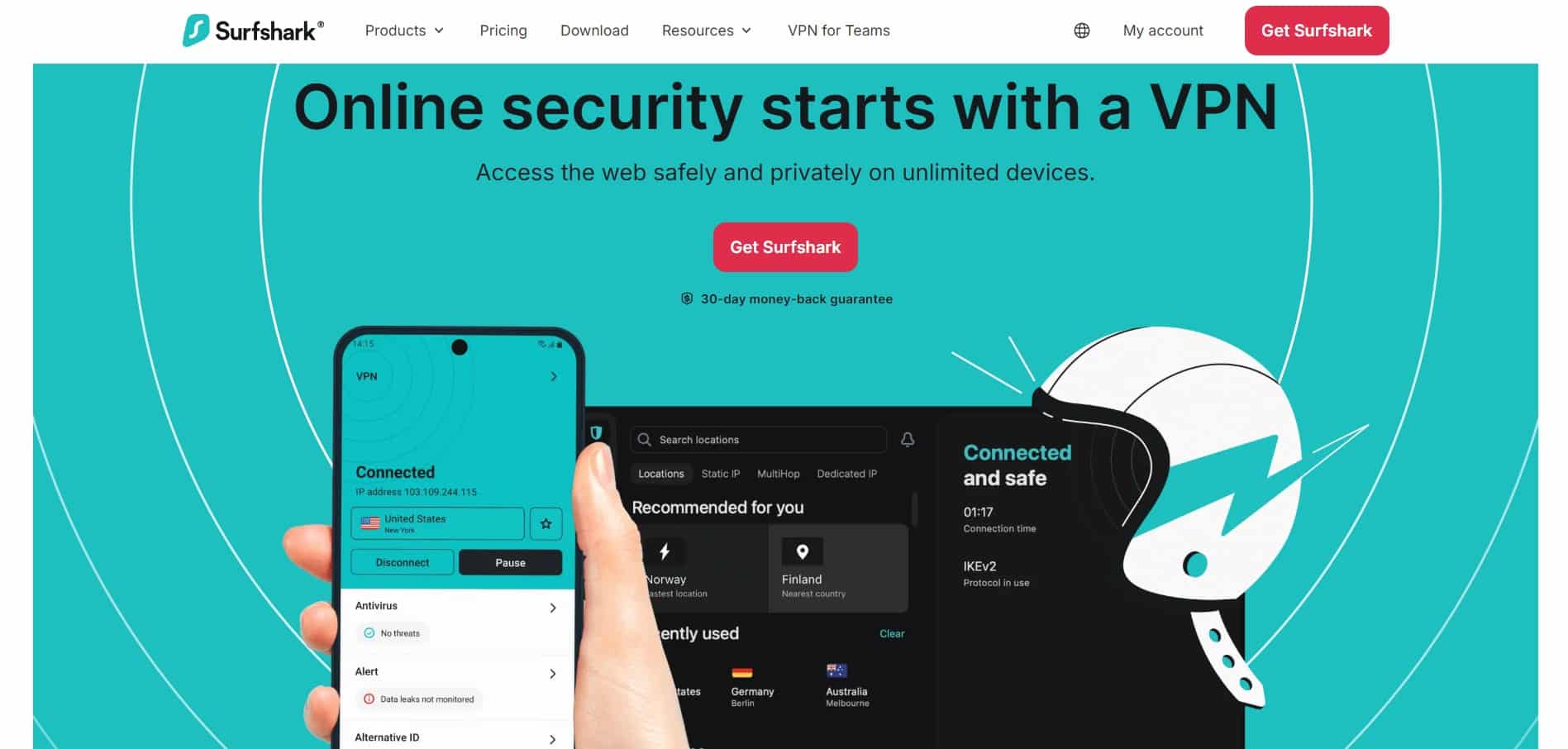
Surfshark is attractive to anyone looking for a solid Prime Video VPN at a price point that makes it extremely affordable. It starts at just US $2.49, which puts it firmly in the cheap VPN category, but comes stacked with the features you need to stay safer online and ensure the best performance even while streaming privately at work or on vacation.
It has more than 4,500 servers in 100 countries, including excellent coverage in popular Prime regions. In my tests, Surfshark kept my broadband internet running just 4% slower than my baseline. This is a staggeringly low drop in performance, which explains why I could stream Prime, Netflix, Hulu, and BBC iPlayer without any buffering.
The large server network also means that you have plenty of server options to try if Amazon Prime blocks one of its existing IP addresses. This makes it much more dependable than the average low-cost VPN.
When it comes to privacy, you get incredible bang for your buck. You get a kill switch, DNS, IPv6, and WebRTC leak protection, RAM-only servers, NoBorders mode (automatically picks the best server on restrictive networks), obfuscation, split tunneling, and an independently audited no-logs policy. That is a fully featured, highly versatile VPN plan for the price.
Another reason people keep coming back to Surfshark is that it allows unlimited simultaneous connections. This makes it worth considering if you own many gadgets or want a VPN your entire family can use without having to yell through the house for someone else to disconnect when you need it.
Pros
- Cheap without skimping on servers, features, or third-party audits
- Unlimited simultaneous connections
- 4,500+ servers in 100 countries
- Fast WireGuard speeds for HD streaming
- Works reliably with Prime Video
- Strong privacy and leak protection
Cons
- No port forwarding
BEST BUDGET VPN FOR AMAZON PRIME:Surfshark works with Prime Video and a wide choice of international streaming services, such as Netflix, Hulu, HBO, Paramount+ USA, DAZN, BBC iPlayer, Kayo, Globo, Joyn, and many more. Every plan comes with a 30-day money-back guarantee to test it.
3. Proton VPN

Proton VPN is a highly reputable service created by the team behind Proton Mail. This VPN has always been great for advanced features, but it used to be a bit too expensive for average users. In 2026, this has changed. Proton VPN Plus is now priced at just $2.99 per month, which is extremely competitive considering just how many advanced privacy features you get.
Proton VPN supports Amazon Prime Video in a wide selection of regions, including the US, UK, Japan, Canada, Germany, Spain, and Australia. In my tests on the UK and US catalogs, Proton VPN’s Prime Video access worked without triggering the proxy error. With more than 20,000 servers in 140+ countries, you have plenty of options if Amazon blocks a server.
In terms of performance, Proton is both reliable and versatile. The VPN’s apps support the modern WireGuard protocol, and Proton has developed a feature called VPN Accelerator, designed to improve performance on long-distance connections. This is perfect if you’re trying to stream Prime Japan from the USA, for example.
While Proton is effective for streaming, its privacy features are where it truly shines. The Plus plan gives you access to all core VPN features, including Secure Core servers in hardened locations, split tunneling, port forwarding, a custom Stealth VPN protocol for obfuscation, a system-level VPN kill switch, and fully open-source apps.
It has also completed independent security audits, so you can trust the apps and infrastructure to deliver robust online privacy as advertised. In my opinion, the depth of its features makes it perfect for advanced users, especially people who torrent or need to get connected on restrictive networks or in countries such as the UAE, Saudi Arabia, Iran, Qatar, and Egypt.
Proton comes with apps for Windows, macOS, Linux, Android, iOS, Apple TV, Android TV, and Firestick, with up to 10 simultaneous connections. This makes it suitable for people with many devices or families who want VPN access across all their devices.
Pros
- Works with Prime Video in 20+ regions
- 20,000+ servers in 140+ countries
- VPN Accelerator and WireGuard
- Secure Core and Stealth
- Port forwarding and split tunneling
- Open-source and independently audited apps
Cons
- Limited to 10 simultaneous connections
- More advanced than some beginners need
BEST FOR ADVANCED FEATURES:Proton VPN works to change your Prime Video region privately and securely on any network. It is especially attractive for advanced users who want additional features for torrenting, bypassing strict blocks, or ensuring that VPN use remains secure in restrictive countries with overreaching censorship. You can test it risk-free using the 30-day money-back guarantee.
4. ExpressVPN

ExpressVPN makes streaming Prime Video easy. It only slowed my connection by 6.9% across the three locations I tested. This makes it fast enough for HD and 4K streaming. It also worked with Netflix, Hulu, BBC iPlayer, and a bunch of popular international streaming services, making it a decent all-rounder for anybody interested in international TV access.
ExpressVPN has servers in 113 countries and custom apps for all popular devices. I found the apps easy to use, which is why ExpressVPN is often praised by people looking for a VPN that works without messing around with complicated settings. Obfuscation is built into its OpenVPN connection by default, which makes this VPN easier to use at work, in school, or on restricted public wifi hotspots.
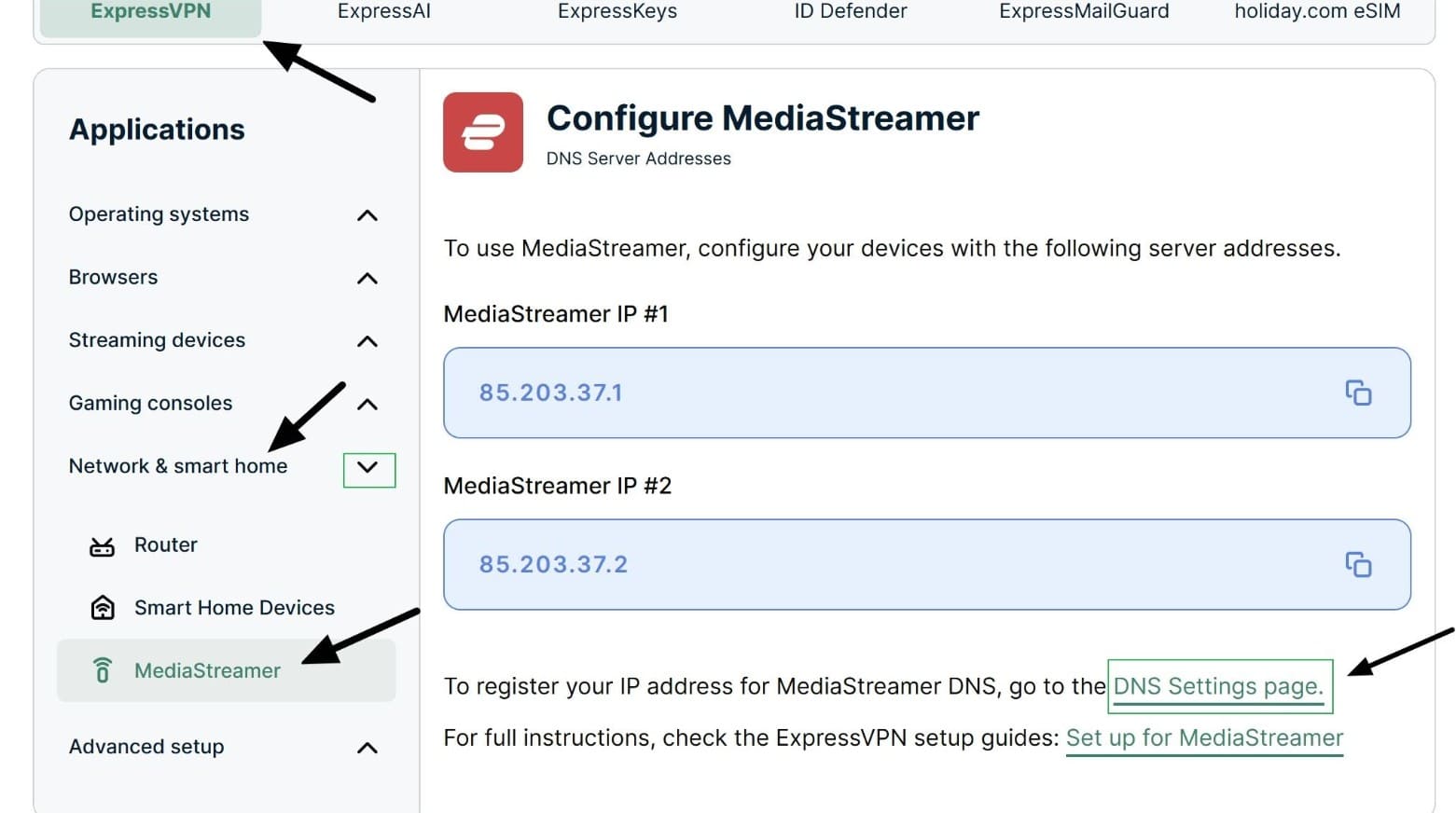
Another useful feature is MediaStreamer. This gives you another option for streaming on smart TVs, consoles, and set-top boxes. Just bear in mind that MediaStreamer uses DNS routing to change your location. It does not encrypt your traffic like the main VPN app.
ExpressVPN is also at the top of the industry for privacy. Every plan (including Basic) comes with RAM-only TrustedServer infrastructure, a kill switch, leak protection, split tunneling, and its custom Lightway protocol. ExpressVPN has also undergone independent audits and maintains a rock-solid no-logging policy, which gives users plenty of confidence.
The best thing about ExpressVPN in 2026 is that it has massively reduced the cost of subscriptions. The Basic plan, which used to be its only plan and gives you full access to all VPN features without limitations, starts at just $2.99 per month. This means you get the same VPN service that has kept people coming back since 2009 at a hugely reduced rate.
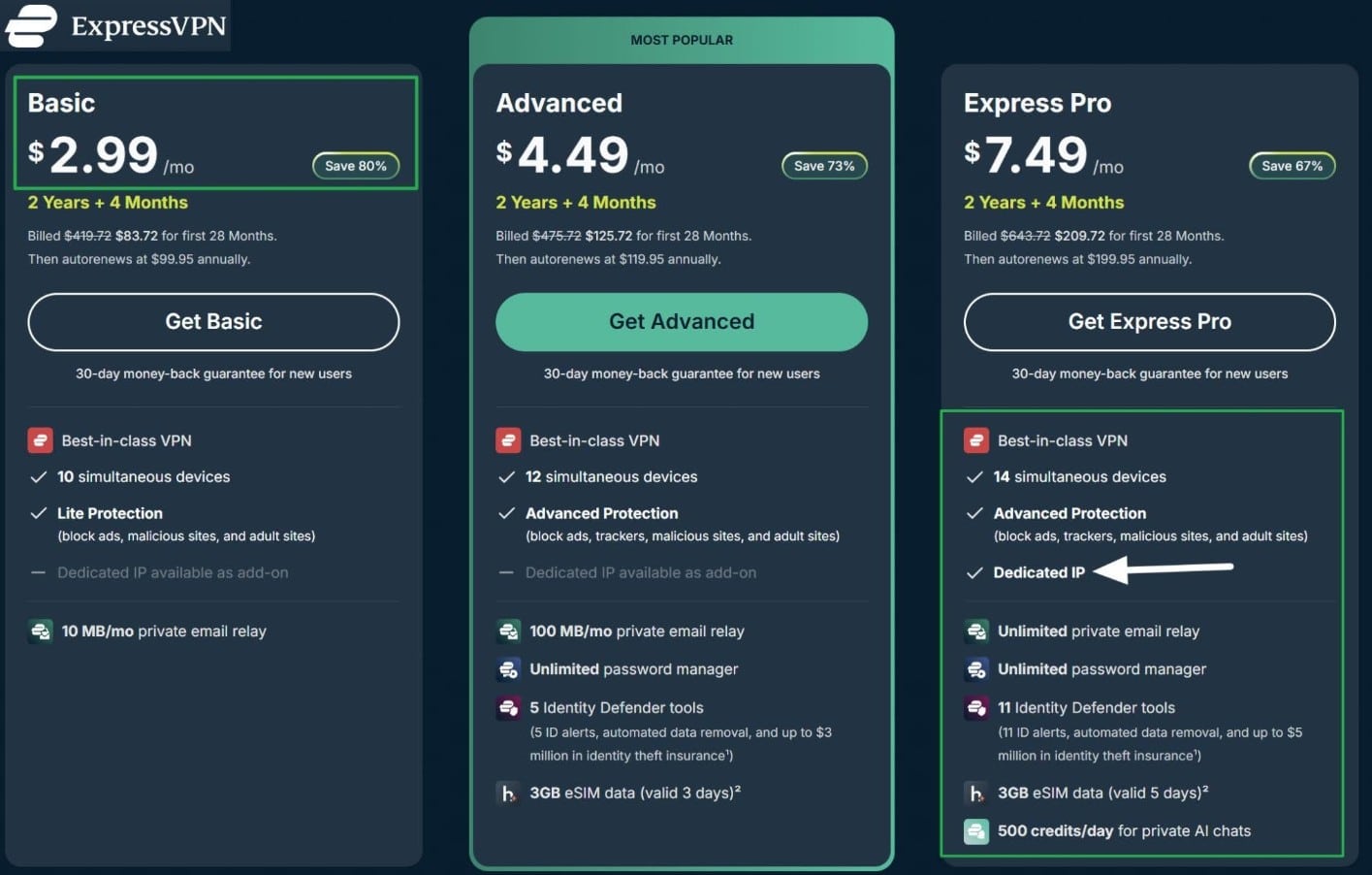
If you do decide to pay for an upgrade, you will get a lot of impressive extras, including a dedicated IP, private AI chatbot access, a password manager, and an email alias service that helps you sign up for services without exposing your primary email address.
Pros
- Reliable Prime Video access
- Excellent speeds during my tests
- Very easy-to-use apps
- Automatic obfuscation
- MediaStreamer for TVs and consoles
- Dedicated IP option
Cons
- Fewer advanced customization options than some of my top picks
- No port forwarding
EASY TO USE WITH PRIME VIDEO:ExpressVPN uses its custom Lightway protocol, with Turbo mode on Windows for optimal streaming speeds. MediaStreamer (Smart DNS) is included at no extra cost for streaming Prime Video USA on devices that won’t let you install a VPN directly. It includes a 30-day money-back guarantee so you can test it yourself.
5. CyberGhost
CyberGhost VPN is a provider based in Romania, with a rock-solid track record of providing privacy for its users. One of its main advantages is that it is designed from the ground up with beginners and home users in mind.
To make things really simple, this VPN has servers labeled for specific use cases such as streaming, gaming, torrenting, and privacy. The streaming servers are listed by country and streaming platform, so you can find servers for Prime Video USA, Prime Video UK, Prime Video Australia, and many other regions. The same applies to dozens of other streaming platforms worldwide.
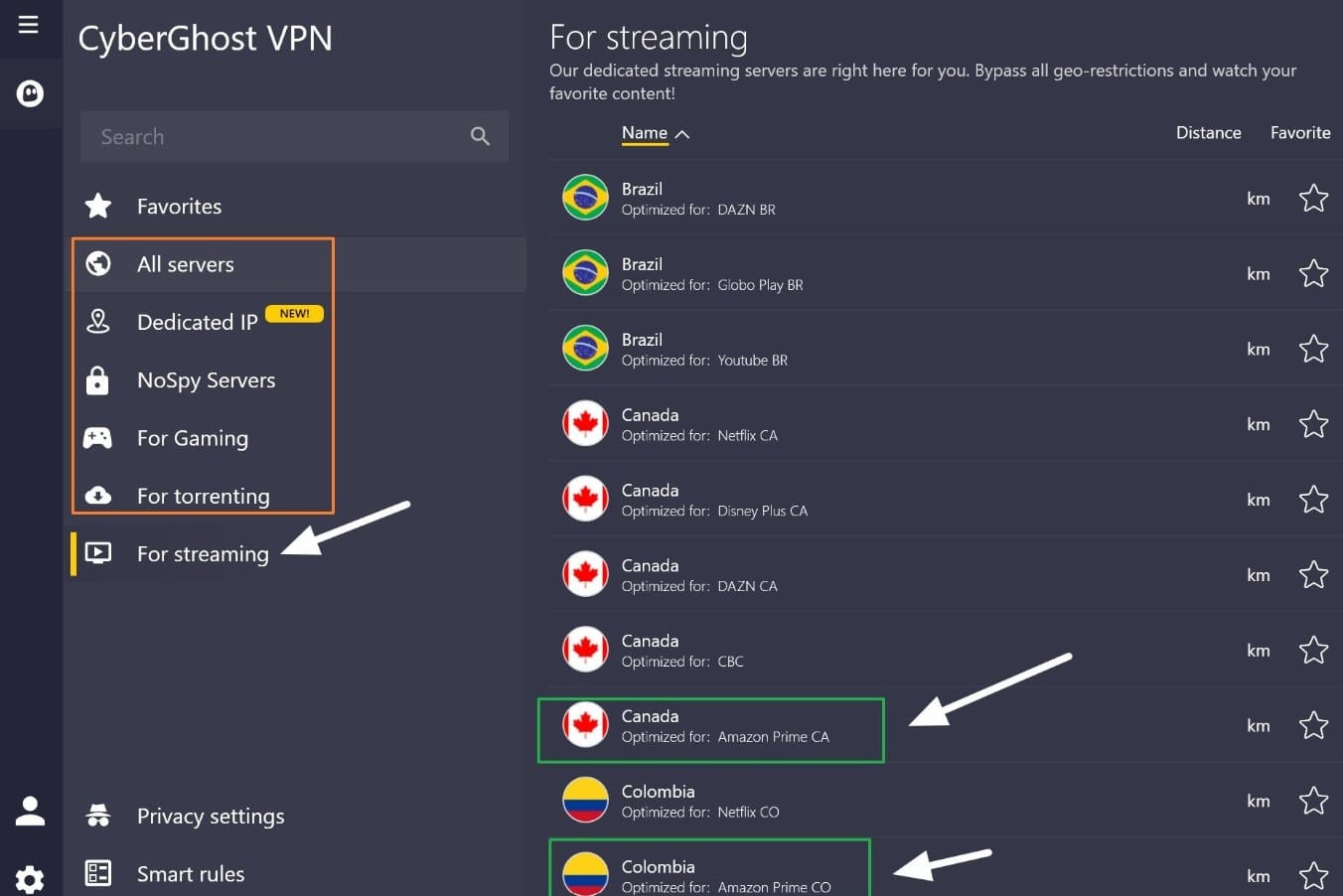
In terms of features, this VPN is not as advanced as something like Proton VPN. You won’t find port forwarding or advanced protocol customization options. Instead, the VPN is set up to be secure and reliable out of the box, which takes away some of the initial setup stress and means that newbies to VPNs can get right to the fun stuff: using the internet without being tracked and with an IP address in more than 100 countries around the globe.
Speeds are excellent, with WireGuard available for fast streaming. You also get an automatic kill switch, DNS and IP leak protection, split tunneling, and up to 7 simultaneous connections. CyberGhost has been independently audited, which helps verify its privacy claims and no-logs policy. 24/7 live chat is available if you need help finding a Prime server. There are apps for all popular devices, and you can test it yourself for 45 days thanks to its generous money-back guarantee.
Pros
- Streaming servers labeled by platform and country
- Works with Prime Video in multiple regions
- Easy apps for beginners and home users
- Fast WireGuard connections
- Automatic kill switch and leak protection
- Smart Rules auto-connects you to your favorite server when you launch the app
Cons
- Fewer advanced privacy controls than others
- No port forwarding
BEST FOR BEGINNERS:CyberGhost makes it easy to find a server that works with Prime Video in regions all around the globe. You also get labeled servers for gaming, torrenting, and added privacy (NoSpy). The apps are very simple to set up and use. Its superb WireGuard implementation makes it fast for data-intensive tasks like streaming and making VoIP calls in countries where messengers are blocked. Comes with a generous 45-day money-back guarantee.
6. IPVanish

IPVanish is a US-based VPN that performs superbly for accessing US streaming services, and a variety of international platforms too. It used to struggle with some international TV platforms, but my most recent review proved that the VPN has massively extended its coverage. It has servers across 20+ US cities, giving you plenty of locations to try for Prime Video USA, Netflix US, and other American streams. It also allows unlimited simultaneous connections, which means you won’t have to argue with the kids when you all want to use the VPN for different reasons.
In terms of features, IPVanish gives you WireGuard, a kill switch, DNS and IPv6 leak protection, split tunneling, and Scramble (which is what it calls its XOR-based obfuscation). Apps are available for all major platforms, including Fire TV, and the Essential plan starts at just US $2.19 per month. This makes it an absolute bargain if you mainly want a fast VPN for streaming and everyday privacy.
The caveat? IPVanish is based in the US, so it is not my first choice for advanced privacy use cases or users with an elevated threat model. That said, IPVanish has a proven no-logs policy, so it still makes sense for users looking for affordable US streaming access, unlimited devices, and easy-to-use apps that help prevent tracking at work, at home, or on public Wi-Fi.
Pros
- Excellent for US streaming services
- Servers across 20+ US cities
- Unlimited simultaneous connections
- Fast WireGuard performance
- Works with Prime Video USA and Netflix US
- Kill switch, leak protection, split tunneling, and Scramble
Cons
- Based in the US
- No port forwarding
STRONG US STREAMING ACCESS:IPVanish represents excellent value for money if you mainly want to access Prime Video USA from abroad, at work, or in school. Unlimited connections make it a great choice for families or people who own many devices. Fast WireGuard speeds make it a pleasure to use when streaming. 30-day money-back guarantee.
Methodology: How I picked the best VPNs for Amazon Prime Video
Every VPN is different, and while that means that there’s a service for every situation, it also makes it tricky for newcomers to decide which one to use. That’s where I come in: I’ve carefully considered the most important things a VPN should offer for streaming Amazon Prime Video and used these criteria to filter out unsuitable services until only the best were left:
Here is what I looked for when comparing and ranking the VPNs in this list:
- I tested Prime Video with the VPN location matching the Amazon account region to make sure I could access the US, UK, and other popular regions
- Fast server speeds for HD and 4K streaming without buffering
- Plenty of server and IP options if Amazon blocks a specific VPN address
- Strong encryption, a VPN kill switch, DNS leak protection, and a no-logs policy
- Secure protocols such as WireGuard, OpenVPN, NordLynx, Lightway, or Stealth
- No IP, DNS, IPv6, or WebRTC leaks during testing
- Apps for Windows, macOS, Android, iOS, Fire TV, Apple TV, and other popular devices
- Smart DNS or router support for TVs and consoles that do not support VPN apps
- Obfuscation or stealth features for accessing Prime Video on restrictive work, school, hotel, and public wifi networks
- Checked whether mobile apps expose location through GPS or other device-level location services
- I tested Fire TV performance and kill switch stability during streaming
- Checked whether built-in ad blockers and threat protection features interfere with Prime Video playback
- I tested Prime Video across different browsers to identify any browser-specific compatibility issues
- Easy-to-use apps and responsive live chat support
- Dedicated IP availability for users who want a consistent VPN IP
- Reliable access to Netflix, Hulu, BBC iPlayer, and other international streaming platforms alongside Prime Video
- Decent value for money compared with the performance and features you get
- A money-back guarantee that lets you test the VPN with Prime Video risk-free
This is just an overview, but you can read more about my testing and ranking process in our detailed methodology article.
How do you use a VPN with Amazon Prime Video?
Using a VPN with Amazon Prime Video is easy as long as you stick to a fully tested service. Many VPNs have already been blocked by Amazon, but all my recommendations have proven themselves to have servers that work with Prime Video right out of the box. That means you can follow the setup steps below to get started immediately.
Here are the steps needed to set up a VPN for Amazon Prime Video:
- Pick a VPN that works with Amazon Prime Video. NordVPN combines fast NordLynx speeds with reliable Prime Video access in multiple regions. Surfshark is great if you want a cheaper option that allows you to use the VPN on an unlimited number of devices.
- Sign up for the VPN. The links in this guide automatically apply a steep discount so you can get your chosen provider at the best price, and you still get access to the VPN’s money-back guarantee, so you can test it with Prime Video risk-free.
- Download and install the VPN app. My recommendations have apps for Windows, macOS, Android, iOS, Fire TV, and other popular streaming devices. This makes it easy to stream Amazon Prime privately on any device.
- Connect to a server in the country you want to access. Pick a server in the US for Prime Video US, the UK for the British catalog, or another supported region depending on what you want to watch. You can use resources like JustWatch to find titles that are exclusive to other regions. Bear in mind that Amazon uses your account registration country when deciding what content to show you. This makes it easy to access your home catalog on vacation. I explain how to switch the region tied to your account below.
- Open Prime Video and start streaming. Amazon will now detect the VPN server’s IP address instead of your real location. If your account region matches the location you selected, Prime Video should serve you the corresponding catalog without triggering the proxy error.
EU Travel Tip: Cross-border portability rules
If you live in the EU and are traveling to another EU country on vacation, you won’t need a VPN to access your home Prime Video library. EU cross-border portability rules require paid streaming services to let you continue watching your home catalog even while roaming. However, a VPN will still help if you want to use your account on restricted networks such as at work or on hotel wifi.
How to change your Amazon Prime account region
Amazon uses the country tied to your account to decide which regional content and services to serve you. This means you may need to update your account to ensure it works smoothly with your VPN.
- Sign in to your Amazon account.
- Open Manage Your Content and Devices.
- Select Preferences.
- Open Country/Region Settings and click Change.
- Select an existing address or enter an address in the country where you live, then click Update.
- Connect your VPN to the same country. Clear your cookies or open a private browser window, then sign back into Prime Video.
Remember: Amazon requires your account country and residential address to match your country of residence. When you change the region tied to your account, it could affect linked Amazon services such as Kindle, Audible, Amazon Music, Prime Video purchases, Prime Reading, Family profiles, gift balances, and some subscriptions.
According to Amazon, switching regions can take up to 24 hours to apply, so don’t necessarily expect the changes to register right away. If switching your region negatively affects important services, switch back to your previous region by repeating the same steps.
Does Amazon limit how many times I can change my account region?
Amazon does not limit how many times you can change your account region, and you can easily reverse the change by repeating the steps to switch back to your old region. Just bear in mind that Amazon says each change can take up to 24 hours to apply.
This is an important consideration because, in practice, using a VPN to change your Prime region may not be as instantaneous and convenient as switching regions to watch a movie or TV show, and then switching back to continue shopping or using other apps in your home region.
Can I create a second Amazon Prime account for another country?
Some VPN reviewers recommend making a secondary “free” Amazon account instead of switching regions with your existing account. However, this advice overlooks the major financial catch: Amazon Prime Video is a paid service, so creating a new secondary Amazon account won’t give you access to video streaming or subscriptions tied to your original account. Instead, you will need to pay for another subscription to stream content.
Can I use a free VPN for Amazon Prime?
No. I tested trusted VPNs that offer a free plan, like Proton VPN Free, Hotspot Shield, Windscribe, and TunnelBear, and none of them worked to access regional Prime Video catalogs.
This is because these VPN providers offer only a basic free plan to help people stay private when they need it. A free VPN is seen as an important access and privacy tool for users living in countries with overreaching censorship, or for protecting their data on public Wi-Fi. However, access to premium features for streaming or torrenting is usually limited to paying subscribers.
You may also find other free VPNs on app stores like Google Play, but you should avoid them. The vast majority of free VPNs have invasive privacy policies and apps that are designed to use your data to create a revenue stream. These VPNs often include tracking libraries in their apps and will monitor your activities for profiling purposes.
To make things worse, studies have found that dozens of free VPNs lack basic privacy protections such as encryption or leak protection. This means that when you use those free VPNs, local networks and ISPs may still be able to track everything you do online. This is the exact opposite of what a reliable VPN does, which is to give you rock-steady online privacy and data security.
Best Amazon Prime Video VPN: FAQs
Why am I being directed to primevideo.com/vpn?
Amazon believes it has detected a VPN or proxy connection. Try reconnecting to your VPN to get a fresh IP, switch to a different server location in the same country, and clear your browser cookies and cache (or access Prime using Incognito mode if you prefer not to delete cookies). If you are not using a VPN, your ISP-assigned IP may have been incorrectly flagged.
Is using a VPN with Amazon Prime Video legal?
VPNs are legal in most countries, and using one with Prime Video isn't illegal in those places. However, Amazon does not officially support streaming Prime Video through VPN or proxy connections, so doing so may violate its terms of service. That said, we've never heard of anyone facing repercussions for using a VPN, other than receiving the proxy error.
Why does Amazon block VPNs?
Amazon licenses movies and TV shows for specific countries, which is why it must limit its catalog around the globe. It uses location controls (geo-blocks) to enforce those contractual obligations and constantly monitors for VPN use to block IP addresses that are believed to be used for location spoofing.
How does Amazon detect VPNs?
Amazon detects VPNs using a mix of automated techniques. First, it leverages databases of known IP address ranges that belong to proxies or VPNs. Next, it tracks how many different subscriber accounts share the same IP, flagging it as suspicious if multiple users and accounts appear to use the same IP address. VPN use may also be suspected when your IP address (VPN location) conflicts with your account or billing region, or when DNS, IP, or WebRTC leaks expose your real location.
Can I use a VPN with Amazon Prime on Firestick?
Yes. The VPNs I recommend include apps that are compatible with Firestick and that you can install directly from the Amazon Appstore. Once you have installed the Firestick VPN app, connect to the country you want, then launch Prime Video. If the app still shows the proxy error, switch servers to get a fresh IP address.
Just bear in mind that your Firestick is linked to your Amazon account. If you are trying to access a foreign Prime Video catalog rather than your home region while traveling, you may also need to update the country tied to your Amazon account to match your VPN location.
Still failing? Test logging in to your Prime Video account using your Firestick’s browser (Amazon Silk) to see if this helps.
Contents [hide]
- How to fix the Amazon Prime Video proxy error
- Prime Video is constantly buffering
- Amazon Prime thinks I have a VPN, but I don’t
- Best VPNs for Amazon Prime Video: My top picks
- 1. NordVPN
- 2. Surfshark
- 3. Proton VPN
- 4. ExpressVPN
- 5. CyberGhost
- 6. IPVanish
- Methodology: How I picked the best VPNs for Amazon Prime Video
- How do you use a VPN with Amazon Prime Video?
- How to change your Amazon Prime account region
- Can I use a free VPN for Amazon Prime?
- Best Amazon Prime Video VPN: FAQs
- Why am I being directed to primevideo.com/vpn?
- Is using a VPN with Amazon Prime Video legal?
- Why does Amazon block VPNs?
- How does Amazon detect VPNs?
- Can I use a VPN with Amazon Prime on Firestick?