You can use a VPN with Tor in two ways: Tor over VPN and VPN over Tor. In the former case, you connect to the VPN first, open Tor Browser, and you’re set. Some VPNs have built-in Tor over VPN servers if you prefer to stick with your own browser, though Tor Browser offers extra features to make you more anonymous online.
VPN over Tor connects to Tor first, then routes your VPN connection through the Tor network. This setup requires some additional configuration and a VPN that supports connections through Tor.
Both methods change what your ISP, VPN provider, and Tor relays can see, so each comes with its own privacy trade-offs. In this guide, we’ll walk you through both setups, then look at the pros and cons of each. We’ll also cover Tor bridges and when they might be a better option.
How to use a VPN with Tor
We’ll start with the simpler Tor over VPN setup, then cover VPN over Tor afterward.
How to set up Tor over VPN
You can get Tor over VPN running in just a few steps:
- Subscribe to a reputable VPN service. NordVPN and Proton VPN are both excellent options with built-in Tor over VPN support, though Surfshark works well on a budget.
- Download and install the VPN on your device. Note that Tor Browser does not work on iOS or iPadOS. As such, a VPN with Tor over VPN is the simplest option to access the Tor network on an iPhone or iPad.
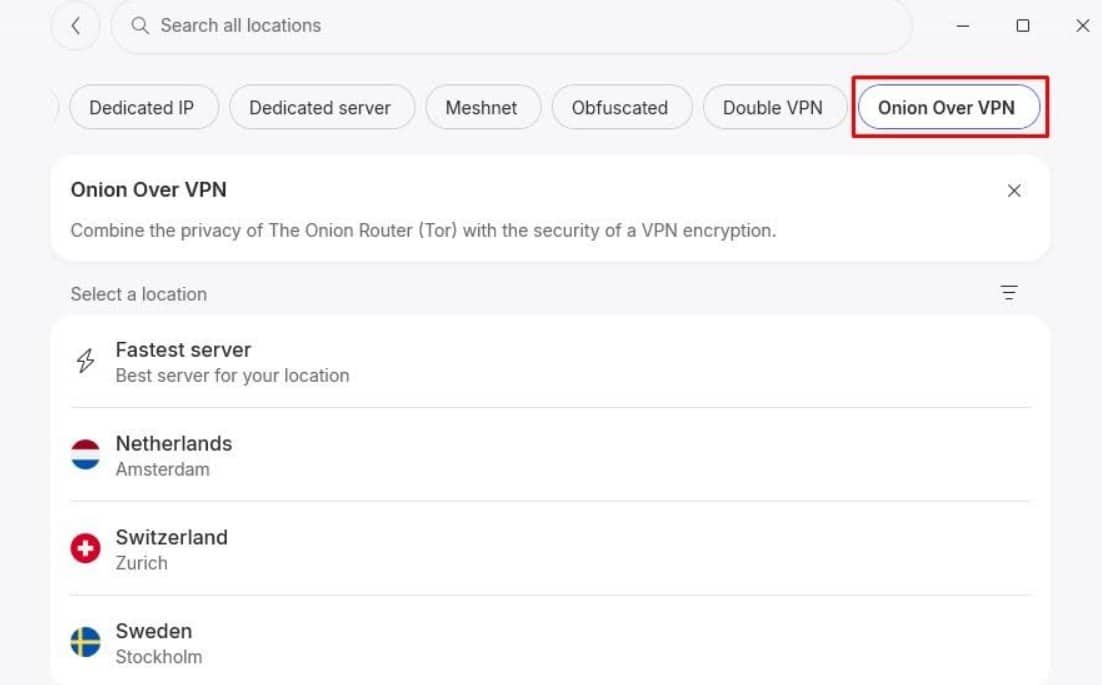
- Launch the VPN app and connect to a server. NordVPN has “Onion over VPN” options listed under its list of locations. Proton VPN has servers marked with an onion icon, though you can also type in “TOR” in the search bar.

- If you’ve connected to a Tor-over-VPN server, you can use your regular browser, including Safari on iOS and iPadOS. Otherwise, open Tor Browser and enjoy improved anonymity.
How to set up VPN over Tor
Switching the order so traffic passes first through Tor and then through the VPN is less common. It takes more effort because you need to establish the VPN connection through Tor, usually requiring the VPN provider’s support, and not many quality VPN providers offer this feature. AirVPN is one of the few that do so we’ll use its setup guide as a base here, though the steps may vary if you’re using a different provider.
- Sign up for a VPN that supports VPN over Tor. AirVPN is our top pick here.
- Install Tor Browser and your VPN client. Open Tor Browser to connect to the Tor network before continuing.
- Configure the VPN to connect through Tor. Follow your provider’s instructions for this. On AirVPN, for example, go to Preferences and select Tor as the connection mode.
- Test the connection. Click Test to make sure AirVPN can connect through Tor. With the standard Tor Browser installation, AirVPN should handle the required Tor authentication automatically.
- Connect to a server. Once connected, your traffic will pass through Tor and then the VPN server before reaching its destination.
Note: Tor Browser connects directly to the Tor network (since you open it before connecting to the VPN), so its traffic stays outside the AirVPN tunnel.
If you check your connection on AirVPN’s website using Tor Browser, it may show a Tor exit node’s IP address and report that you’re not connected. Use another browser to check the VPN connection instead.
Tor over VPN vs VPN over Tor: Which should you pick?
For most people, Tor over VPN is the simpler choice. It hides your Tor use from your ISP and lets you access .onion sites. VPN over Tor can help you reach websites that block Tor. Which one you use depends on which part of your connection you want to hide and which sites you need to access.
Pros and cons of Tor over VPN
With Tor over VPN, you connect to the VPN first, then send your traffic through the Tor network. Your VPN server becomes the first point of contact with Tor, so your ISP sees the VPN connection rather than a direct Tor connection.
Pros:
- Setup is pretty straightforward.
- Some VPNs offer built-in Tor over VPN connections (e.g., NordVPN’s Onion Over VPN option).
- Your ISP can’t see that you’re connected to Tor
- The first Tor relay sees the VPN server’s IP address instead of yours.
- You can access .onion sites.
Cons:
- Websites can see that your connection comes from a Tor exit node.
- Your VPN provider can see your real IP address.
- You may be unable to access websites that block Tor exit nodes.
- An unencrypted connection between the Tor exit relay and the destination can be visible to the exit relay.
Pros and cons of VPN over Tor
In this case, you connect to Tor first, then connect to the VPN. As a result, the VPN server becomes the final point before your traffic reaches its destination, which can let you access websites that block Tor connections.
Pros:
- Websites see the VPN server’s IP address rather than a Tor exit node.
- Your VPN provider doesn’t see your real IP address.
- You may be able to access websites that block Tor connections.
- The VPN tunnel encrypts your data while it passes through the Tor network.
- A Tor exit relay can’t see the contents of your VPN traffic.
Cons:
- VPN over Tor isn’t supported by many VPN providers.
- Your ISP can see that you’re connecting to Tor.
- The first Tor relay can see your IP address.
- You generally can’t access .onion sites through the VPN connection.
- Routing other applications through Tor can require extra configuration.
Why use a VPN with Tor?
Using a VPN with Tor can provide some extra privacy and make your Tor connection less obvious. It also changes who can see your connection to Tor, which is essential if your ISP or network blocks Tor traffic. Basically, a VPN can:
- Hide your IP from Tor: With Tor over VPN, the first Tor node sees the VPN server’s IP address instead of yours.
- Hide Tor use from your ISP: Your ISP sees your VPN connection rather than a direct connection to the Tor network.
- Bypass Tor blocks: A VPN can help you access Tor when your ISP or network blocks direct Tor connections.
- Add another layer of encryption: The VPN encrypts your connection between your device and the VPN server, adding protection on that part of the journey.
Why you shouldn’t use a VPN with Tor
No, this isn’t a Dr. Jekyll and Mr. Hyde situation.
We just don’t want to give the impression that using a VPN with Tor is some magical privacy combo. Beyond the drawbacks we’ve covered in the pros and cons sections, there are a few other things worth considering before you add a VPN to your Tor setup:
- It can slow down your connection: Using Tor makes browsing slower, especially when using a VPN
- You have to pay for a good VPN: Free VPNs often come with data caps, slower speeds, or logging practices that can compromise your privacy, making them a poor fit for Tor. Go for a reliable no-logs VPN if you’re adamant about combining the two.
- Tor already provides strong anonymity on its own: A VPN only makes sense if you want to hide your Tor connection from your ISP or prevent the first Tor relay from seeing your real IP address.
- Many VPNs don’t support VPN over Tor: You may have fewer VPNs to choose from if you want to use this setup.
Testing methodology: How I chose the best VPNs to use with Tor
Tor already provides strong privacy protections, so a VPN needs to complement those protections rather than simply offer a long list of standard VPN features. I focused on privacy, security, speed, and how easily each VPN service works with Tor:
- Tor compatibility: I focused on VPNs that offer built-in Tor support (i.e., Onion over VPN servers) or clear guides for configuring the VPN to work with Tor.
- Privacy: I looked at the provider’s logging practices, privacy policy, and jurisdiction to determine how much information it can collect about your VPN connection.
- Security: Robust encryption, secure VPN protocols, DNS leak protection, and features such as a kill switch can help protect your connection if the VPN disconnects or something goes wrong.
- Speed: Tor already adds latency by routing your traffic through multiple nodes, so you need a fast VPN to limit slowdowns. I tested each provider’s speeds without Tor, and again while connected to the Tor network.
- Reliability: A VPN connection that frequently drops or struggles to connect can make using Tor more annoying than it needs to be. I looked for providers with stable connections and reliable apps for Windows, Mac, Android, and Linux.
Should I use Tor bridges instead of a VPN?
Tor bridges can be a good alternative to a VPN if your ISP or network blocks Tor. Unlike regular Tor relays, bridge addresses aren’t publicly listed, making them harder to identify and block. Some bridges use techniques that make it harder for your ISP or network admin to tell that you’re using Tor.
A bridge is useful when you need to bypass Tor censorship. You can get bridges through Tor Browser, email, or Telegram, then configure them directly in Tor Browser. More details on the Tor Project.
How to use a VPN with Tor: FAQs
Can I use a free VPN with Tor?
You can use a free VPN with Tor, but check its privacy policy before signing up. Untrustworthy free VPNs may log your online activity and sell your data, while trusted providers' free plans often come with slow speeds and data caps that make Tor over VPN a sluggish nightmare. A trusty paid VPN is a better choice if privacy is your main concern, and may offer faster, more reliable connections.
Is it legal to use a VPN with Tor?
Using a VPN with Tor is legal in most countries, including the US, much of Europe, and many other parts of the world. However, some countries restrict or ban VPNs or Tor, so check your local laws before using either tool.
Is Tor 100% untraceable?
No, Tor is not 100% untraceable. While it can hide your IP address from websites, mistakes such as logging into personal accounts, installing unsafe software, or revealing identifying info online can link your activity back to you. Your ISP may also be able to tell that you're connecting to the Tor network, and authorities can investigate why you're using Tor in the first place.
Does Tor expose your IP?
Tor exposes your IP address to the first Tor relay your connection passes through. That relay can see your IP, but not the websites you visit. Meanwhile, the exit relay can see which websites you connect to, but it normally can't see your IP address or identify you.
Can the FBI track Tor Browser?
The FBI can track Tor Browser users in some cases, especially when investigators identify weaknesses in a target's device, behavior, or online activity. Tor provides strong anonymity, but it can't protect against every investigation, malware infection, or user error.
One technique the FBI could potentially use is a correlation attack. By watching traffic entering and leaving the Tor network, investigators can compare things like timing and data volume to try to link a Tor user to the website they visited. That said, they'd need to control or monitor enough of the Tor network to see both sides of the connection.
Contents [hide]
- How to use a VPN with Tor
- Tor over VPN vs VPN over Tor: Which should you pick?
- Why use a VPN with Tor?
- Why you shouldn’t use a VPN with Tor
- Testing methodology: How I chose the best VPNs to use with Tor
- Should I use Tor bridges instead of a VPN?
- How to use a VPN with Tor: FAQs
- Can I use a free VPN with Tor?
- Is it legal to use a VPN with Tor?
- Is Tor 100% untraceable?
- Does Tor expose your IP?
- Can the FBI track Tor Browser?