VPN encryption protects your internet connection by scrambling data so unauthorized parties like hackers and your ISP can’t read its contents. It helps keep your online activity private while your data travels across the internet.
While the basics are simple, VPN encryption involves different algorithms, key exchange methods, and protocols that determine how your data is protected. Understanding these parts will help you make sense of the terms and features you’ll see when comparing VPN services, such as AES-256 and RSA-4096.
This guide explains how VPN encryption works, the main types of encryption used by VPNs, and how protocols like WireGuard, OpenVPN, and IKEv2/IPSec combine these technologies to secure your traffic.
What is VPN encryption?
VPN encryption protects your internet traffic by turning readable data into an unreadable format before it leaves your device. Only your device and the VPN server have the keys needed to restore the original data, helping keep your online activity private while in transit.
VPNs combine several security technologies to protect your connection, including encryption, a secure key exchange, and authentication. Together, they create a secure tunnel between your device and the VPN server, each serving a specific purpose throughout the connection.
How does VPN encryption work?
Before a VPN tunnel can protect your data, your device and the VPN server first create a trusted connection and agree on how they’ll secure the data. During this “handshake,” your device and server share a private encryption key.
Once the connection is established, the VPN encrypts outgoing data before sending it to the VPN server. The server decrypts the traffic and forwards it to its destination, while incoming data follows the same process in reverse before reaching your device.
Types of VPN encryption
VPNs rely on different types of cryptography to secure your connection. Some methods encrypt the data you send and receive. Others help your device and the VPN server exchange encryption keys and authenticate each other during the VPN handshake.
1. Symmetric encryption in VPNs
Symmetric encryption protects the data you send and receive after a VPN connection is established. It uses the same encryption key to encrypt and decrypt data, allowing your device and the VPN server to communicate securely throughout the session. Think of it as two people using the same key to lock and unlock a secure mailbox.
Most VPNs rely on fast symmetric encryption algorithms because they can protect large amounts of data with little impact on performance. Common examples include AES and ChaCha20, while older algorithms such as Blowfish have mostly been phased out.
AES
AES (Advanced Encryption Standard) is the most widely used symmetric encryption algorithm in modern VPNs. It protects your internet traffic after the VPN connection is established and is trusted by governments, businesses, and security experts worldwide.
VPN providers typically use AES with 128-bit or 256-bit keys, both of which offer strong protection against current attacks. This is why you might see providers refer to AES-128 or AES-256 encryption.
AES is also fast and efficient, making it a good choice for securing large amounts of internet traffic. Later in this guide, we’ll explain how key length affects encryption strength.
ChaCha20
ChaCha20 is a modern symmetric encryption algorithm designed to provide strong security with high performance. Unlike AES, which is a block cipher, ChaCha20 is a stream cipher that encrypts data as it is transmitted.
Many VPN providers use ChaCha20 with the WireGuard protocol because it performs well across a wide range of devices, especially mobile devices. It is commonly paired with Poly1305, which helps verify that encrypted data hasn’t been modified in transit.
Blowfish (legacy) and Twofish
Blowfish is an older symmetric encryption algorithm that was once used by some VPN providers, particularly with OpenVPN. Over time, it was largely replaced because its 64-bit block size offers less protection than newer alternatives.
Twofish was introduced as Blowfish’s successor and is still available in some encryption software, but commercial VPN providers haven’t widely used it. Instead, most stuck with AES, while newer protocols such as WireGuard use ChaCha20 for encryption.
2. Public-key cryptography and key exchange
Public-key cryptography (also called asymmetric cryptography) helps your device and the VPN server establish a secure connection before any data is encrypted. Instead of protecting your internet traffic directly, it allows both sides to exchange encryption keys without exposing them to anyone else.
Unlike symmetric encryption, this method uses a pair of related keys instead of a single shared key. VPNs use algorithms such as RSA and Diffie-Hellman to exchange encryption keys securely during the VPN handshake.
Public-key cryptography isn’t just used by VPNs. It’s how web browsers securely connect to websites through HTTPS, so you probably used it to read this article.
RSA
RSA is an algorithm that uses a public key to encrypt data and a private key to decrypt it. It’s easier to imagine RSA as a locked mailbox that anyone can drop a letter into, but only the owner can unlock.
RSA is still used by many VPN services for certificate-based authentication, helping your device verify that it’s connecting to a legit VPN server rather than an impostor. Modern VPNs commonly use Diffie-Hellman-based methods to establish the encryption keys used for the session.
Diffie-Hellman
Diffie-Hellman is a key exchange algorithm that allows your device and the VPN server to create a shared encryption key without sending that key across the internet. Once the shared key is created, symmetric encryption uses it to protect the rest of your VPN traffic.
Think of Diffie-Hellman as two people agreeing on a secret code in a crowded room without anyone else figuring it out.
Most VPN services use ephemeral versions of Diffie-Hellman, which generate a new key for every session to improve security. This approach provides Perfect Forward Secrecy (PFS), a feature we’ll explain in the next section.
What makes VPN connections secure?
Strong VPN security depends on more than choosing the right encryption algorithm. Key length affects how difficult encryption is to break, block cipher modes determine how encrypted data is processed, and Perfect Forward Secrecy (PFS) protects past VPN sessions even if an encryption key is compromised later.
1. Key length
Key length refers to the size of the encryption key used to protect your data (measured in bits). As mentioned earlier, you’ll often see terms such as AES-128 and AES-256 in VPN specifications. In general, a longer key is harder to crack using brute-force attacks.
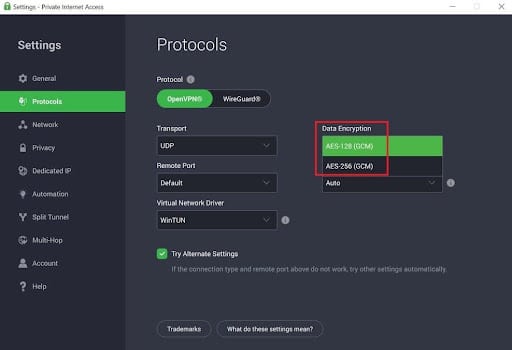
Both AES-128 and AES-256 are considered secure choices for VPNs. AES-256 uses a longer key for additional protection, while AES-128 is slightly faster. Most VPN providers use AES-256, although some, such as Private Internet Access (PIA), still let you choose between AES-128 and AES-256 in their settings.
The same idea applies to public-key algorithms such as RSA. For example, RSA-4096 uses a 4096-bit key. However, key length is only one part of the picture, and RSA and AES use different kinds of cryptography, so their numbers aren’t directly comparable. VPNs usually use RSA for authentication or key exchange, while AES handles the faster bulk encryption.
2. Block cipher modes
Block cipher modes define how block ciphers such as AES process fixed-size chunks of data, called blocks. Different modes affect how data is encrypted, decrypted, and verified, which is where terms like AES-256-CBC and AES-256-GCM come from.
Cipher Block Chaining (CBC)
Cipher Block Chaining (CBC) encrypts each block of data using information from the previous encrypted block, creating a chain throughout the message. It provides strong encryption, but it relies on a separate authentication method, such as HMAC, to verify that the data hasn’t been modified.
Galois/Counter Mode (GCM)
Galois/Counter Mode (GCM) encrypts data while also verifying its integrity, combining both tasks into a single mode. This improves performance and security, which is why many VPN providers implement AES-256-GCM over older modes like CBC.
3. Perfect Forward Secrecy (PFS)
As mentioned earlier, ephemeral Diffie-Hellman generates a new encryption key for every VPN session instead of reusing the same one. PFS prevents one compromised key from exposing every session.
For example, if someone somehow obtained the encryption key from one VPN session, they still couldn’t use it to decrypt traffic from your previous sessions. This limits the impact of a compromised key and adds an extra layer of protection to your connection.
How VPNs verify and protect data
Encryption protects your data from unauthorized parties, but VPNs also need to verify that the data hasn’t been modified in transit and that it’s coming from a trusted source. That’s where message authentication, hashing, and TLS come in.
1. Message authentication
Message authentication verifies that data hasn’t been changed while traveling between your device and the VPN server. If someone modifies the encrypted data in transit, the VPN can detect the change and reject the message instead of processing it.
Poly1305
Poly1305 is a modern message authentication code (MAC) commonly paired with ChaCha20. It creates a unique authentication tag for each message, allowing the VPN to quickly detect whether the data has been altered before it reaches its destination.
HMAC
HMAC (Hash-based Message Authentication Code) is another type of MAC that combines a shared secret key with a hashing algorithm such as SHA-256. This allows VPNs to verify that data hasn’t been modified and that it came from the expected source.
2. Hashing algorithms
Hashing algorithms convert data into a fixed-length value called a hash. VPNs don’t use hashes to encrypt your traffic. Instead, they use them in features such as HMAC to help verify that data hasn’t changed during transmission.
SHA-1 was once widely used by VPNs and other security software, but it is now considered outdated. Modern VPNs typically use stronger hashing algorithms from the SHA-2 and SHA-3 families instead, such as SHA-256 and SHA-384, which are more resistant to collision attacks.
3. Transport Layer Security (TLS)
Transport Layer Security (TLS) is a security protocol that helps your device create a trusted connection with a VPN server or website. During the handshake, it can verify the server’s identity and securely exchange the information needed to start an encrypted session.
TLS is widely used to secure websites through HTTPS, but it also plays an important role in VPN protocols such as OpenVPN. Once the VPN connection is active, the VPN uses the encryption and authentication methods chosen during the handshake to protect your internet traffic.
VPN protocols and their encryption
Now that we’ve made our way through the alphabet soup of VPN encryption, it’s time to see how those technologies come together in the VPN protocols you use every day.
Popular VPN protocols
- WireGuard: Uses ChaCha20-Poly1305 for encryption and authentication, along with modern algorithms for key exchange. VPN providers like NordVPN (through NordLynx) and Surfshark support WireGuard, and many use it as their default protocol.
- OpenVPN: One of the most widely supported and trusted VPN protocols. It uses TLS during the VPN handshake, with AES usually handling the encryption. While it’s generally slower than WireGuard, it’s highly configurable and works on almost every platform.
- IKEv2/IPSec: Combines the IKEv2 key exchange protocol with IPSec to secure VPN traffic. It reconnects quickly when your network changes, making it a popular choice for mobile devices. Most setups use AES encryption and support PFS.
- Proprietary protocols: Some VPN providers develop proprietary protocols or custom versions of existing ones. Examples include NordLynx, Lightway, Hydra, and Dausos, which build on modern cryptographic technologies while adding provider-specific features or performance improvements.
Older VPN protocols
- PPTP: Uses the MPPE encryption protocol with the RC4 cipher, both of which are now considered outdated. Most commercial VPN providers have dropped support for PPTP because of its security weaknesses.
- L2TP/IPSec: Combines the L2TP tunneling protocol with IPSec, which typically uses AES encryption to protect data. Although it’s more secure than PPTP, it’s mostly been replaced by faster and better protocols such as WireGuard and OpenVPN.
- SSTP: Uses TLS to create a secure VPN connection, typically using AES to encrypt data. While it’s still secure, it’s less widely supported than OpenVPN or WireGuard and is mostly found on Windows systems.
How to choose the best VPN encryption
Choosing the best VPN encryption depends on how you plan to use your VPN, but here are some quick pointers:
- For most people: Choose a VPN that supports WireGuard or OpenVPN with AES-256-GCM or ChaCha20-Poly1305. These combinations offer strong security and are used by most leading VPN providers.
- For streaming and everyday browsing: If you’re using a VPN for streaming, WireGuard is usually the best choice because it offers excellent speeds while maintaining strong security.
- For mobile devices: If you frequently switch between Wi-Fi and mobile data, IKEv2/IPsec can reconnect quickly and maintain a stable VPN connection.
- For compatibility: If you’re using an older router, firewall, or operating system, OpenVPN remains the safest widely supported option.
- Avoid older protocols: Steer clear of PPTP, and choose L2TP/IPsec or SSTP only if you need them for compatibility with older systems. Modern protocols like WireGuard and OpenVPN are generally the better choice.
VPN encryption FAQs
How do I know if my VPN connection is encrypted?
Your VPN connection is encrypted when it establishes a secure tunnel using a trusted protocol such as WireGuard, OpenVPN, or IKEv2/IPSec. You can usually confirm this by checking your VPN app for the active protocol and encryption details, which are often listed in the connection settings.
You can also verify VPN encryption by inspecting your network traffic with a tool like Wireshark. When the VPN is active, the captured packets should appear as encrypted rather than readable website requests or app traffic.
What does a VPN service use to transfer encrypted data?
VPN services use secure tunneling protocols like OpenVPN, WireGuard, or IKEv2/IPSec to transfer encrypted data. Depending on the protocol, they use encryption algorithms like AES or ChaCha20 to protect your traffic while it travels between your device and the VPN server.
Does a VPN make all data sent to and from your device secure?
VPNs secure most data sent to and from your device by encrypting traffic between your device and the VPN server. Beyond the VPN server, your connection relies on the security of the destination service, such as HTTPS encryption used by most websites.
Some VPNs also block malicious websites, phishing attempts, and malware downloads, but those features depend on the provider and are separate from the VPN encryption.
Contents [hide]
- What is VPN encryption?
- How does VPN encryption work?
- Types of VPN encryption
- What makes VPN connections secure?
- How VPNs verify and protect data
- VPN protocols and their encryption
- How to choose the best VPN encryption
- VPN encryption FAQs
- How do I know if my VPN connection is encrypted?
- What does a VPN service use to transfer encrypted data?
- Does a VPN make all data sent to and from your device secure?