Is Kalshi blocked where you live? A VPN for Kalshi lets you access the platform while traveling abroad, in Nevada where it is still unavailable, or on any network that blocks it.
Not all VPNs work to unblock Kalshi. Many are too slow or have servers already blocked by the platform. To help you out, I tested leading VPNs for access, speeds, and the privacy features needed to trade on Kalshi privately at work or in school. Keep reading for the best Kalshi VPNs and all the steps needed to keep trading while abroad.
How to unblock Kalshi using a VPN
Kalshi is aware that users bypass licensing rules with a VPN, which is why it invests heavily in blocking VPN IP addresses. As a result, many of the VPNs I tested had already been blocked by Kalshi. Even fewer had the privacy features needed to log in safely at work or in a region where it is blocked. To help you out, I have included my top-recommended VPNs for Kalshi, along with the steps to access your account if it is blocked or unavailable.
Steps to unblock Kalshi with a VPN:
- Choose a VPN for Kalshi. I recommend NordVPN for the best overall performance. It has fast servers across the US and strong privacy features for trading on restrictive networks. Surfshark is an excellent low-cost option that works on unlimited devices. Total VPN is ideal if you want a VPN that comes bundled for free with a highly reliable, low-cost antivirus.
- Subscribe to the VPN. Clicking one of the links above allows you to subscribe at a significant discount of up to 75% off, plus three extra months for free.
- Install the VPN app. Download the app for Windows, macOS, Android, or iOS. My recommendations include apps for all platforms, making it easy to launch Kalshi on any device.
- Connect to a supported location. Pick a US server or another region where Kalshi is available. A nearby server will usually give you the best speeds, so pick a compatible country that is closer if possible.
- Open Kalshi in your browser. Once the VPN connects, visit the Kalshi website and log in.
That’s it. You now have an IP address in a country where Kalshi is available. Just bear in mind that new users must still complete KYC identity checks. A VPN can spoof your location, but it cannot make you eligible if your real country of residence is restricted.
Note: These instructions and VPNs also work with gambling and betting sites.
Kalshi VPN troubleshooting
If your VPN is not working while you’re on vacation to unblock Kalshi, you may see a location error message. You may fail to log in or find that trading remains unavailable even after loading your account. When this happens, I recommend using the troubleshooting steps below.
Kalshi VPN troubleshooting steps:
- Switch to another server in the US or another supported country.
- Try a server in a different city to see if Kalshi accepts the new location.
- Disconnect and reconnect to get a new IP address.
- Clear your browser cookies and cache to remove stored location data.
- Use an incognito or private browsing window.
- Disable browser and device location permissions.
- Use the Kalshi website instead of the mobile app.
- Turn off any other proxy or location-spoofing extensions that may conflict with your VPN.
- Check that your account details and verified country of residence are still valid.
- Contact your VPN’s live chat team to ask which server works best with Kalshi.
- Try another browser or device.
- Update the VPN app.
- Temporarily disconnect the VPN when submitting requested identity documents.
- Check the transaction status and contact support if a withdrawal remains pending.
Methodology: How I selected VPNs for Kalshi
I tested more than 20 market-leading VPNs to find services that are compatible and secure enough to unblock Kalshi. I prioritized security features like AES encryption, reliable VPN protocols, and a kill switch because these are crucial for accessing Kalshi privately without leaking your actual location.
I also tested VPNs for fast connection speeds and a wide choice of server locations. With a shortlist of VPNs in hand, I checked each service to see whether it could unblock Kalshi without location errors, connection failures, IP leaks, or repeated login problems.
Here is the main checklist I used to compare and rank the best VPNs for Kalshi:
- Reliable access to Kalshi from supported locations
- Fast server speeds for loading markets, checking odds, and placing trades without delays
- Multiple US server locations in case one IP address is blocked
- Strong encryption, a kill switch, DNS leak protection, and a no-logs policy
- Apps for Windows, macOS, Android, iOS, and other popular devices
- Easy-to-use apps and responsive live chat support
- Good value for money
- A money-back guarantee for testing the VPN risk-free
VPNs that failed to unblock Kalshi, leaked IP or DNS data, caused repeated location errors, or could not maintain a stable connection were excluded. VPNs that worked but were too slow, overly expensive, or lacked useful privacy features were also penalized. This allowed me to recommend services that not only reliably access Kalshi but also do so securely and at a price that is fair for what you get.
Are there any risks to using a VPN to unblock Kalshi?
If you’re an existing Kalshi user who registered in a valid region using real identity documents and address details to pass KYC checks, you should be safe to continue using Kalshi while on vacation. Using a VPN to log in to your account should not affect your trades or their outcomes.
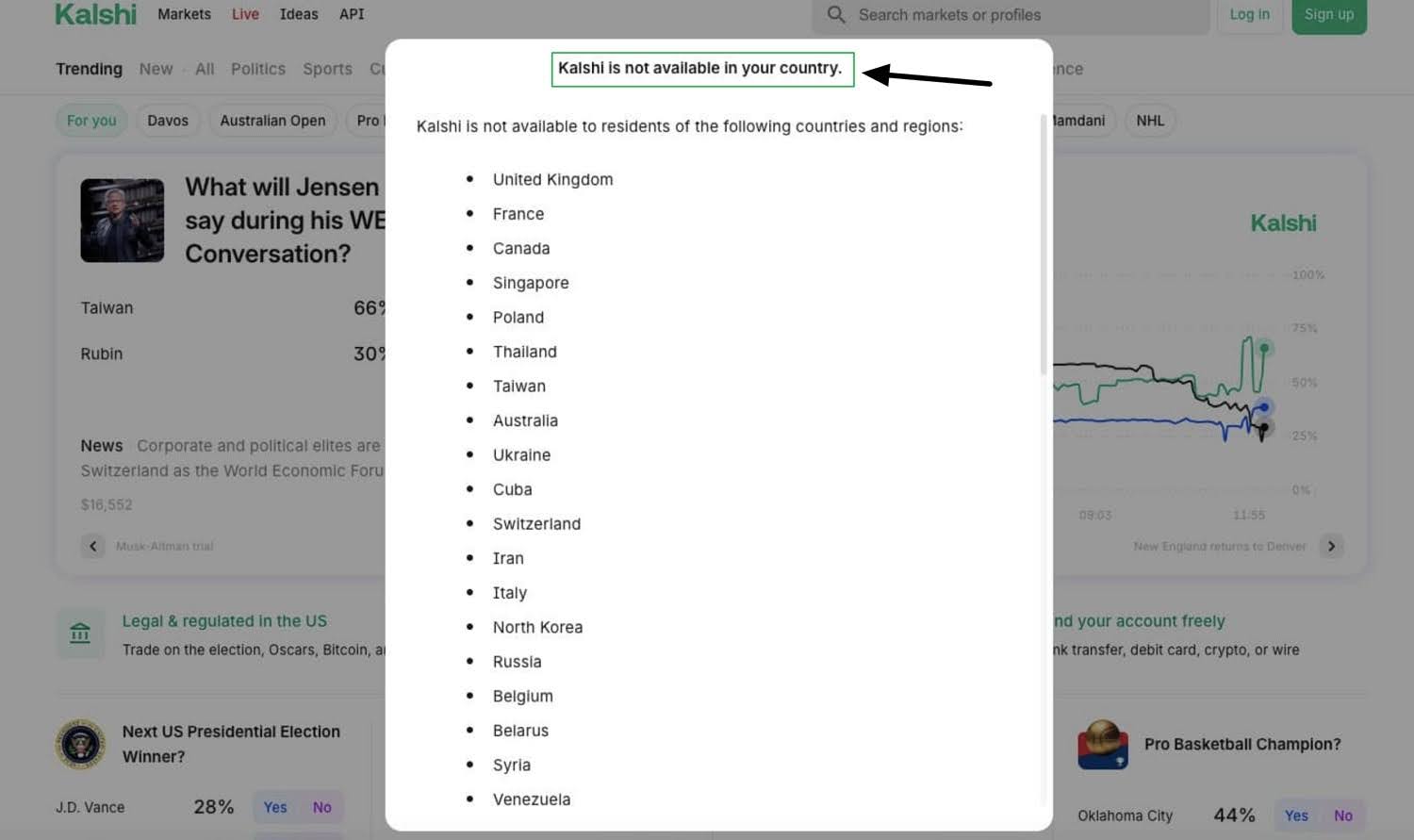
However, a sudden change in your IP address may trigger additional security or identity checks. Kalshi may temporarily restrict your account or delay a withdrawal while it confirms your location and account details. The platform also blocks known VPN IP addresses, so you may need to test a few servers to bypass the “Kalshi is not available in your country” error message.
The risks are much greater if you live in a restricted jurisdiction and use a VPN to pretend that you are eligible. Doing this is a breach of Kalshi’s Member Agreement and could result in account suspension, potentially including frozen funds.
Note that, depending on where you live, bypassing licensing rules may be illegal; always check local laws. I am not an attorney, and nothing in this guide should be taken as legal advice.
Can I use a free VPN to access Kalshi?
No, I recommend against using free VPNs with Kalshi. Free VPNs have limited server capacity, which is often oversubscribed and congested with users from around the globe. This makes it easy for Kalshi to detect VPN use, which could lead to your connection being blocked and potentially trigger additional KYC checks.
Many free VPNs advertised online and in popular app stores, such as Google Play, also lack important privacy and security features. Free VPNs have been found to lack encryption, suffer from leaks, and have invasive data practices. This makes them unreliable for accessing Kalshi privately at work or in countries where it is restricted.
Why is Kalshi blocked in some countries?
Kalshi is a regulated exchange, which means it must comply with local laws wherever it is made available. This includes Know Your Customer rules and potentially other regional regulations.
When you travel to a country where Kalshi trading is restricted, the service uses your IP address to confirm that you are ineligible to place trades. Some locations restrict specific services, such as sports trading, while countries like the UK and Australia restrict Kalshi entirely.
Kalshi expanded to more than 140 countries in late 2025 and may become available in more regions over time. It is possible that, in due course, Kalshi will become available where you live. Until then, you may need to use a VPN to access your account while traveling in a restricted region.
Which countries block Kalshi?
If you travel to any of the countries below, you will need to connect to a VPN to continue using Kalshi. Note that this list may not be exhaustive and is subject to change. In some locations, restricted trading may still be available, so you may want to log in first to check what you can access. If restrictions apply, connect to a VPN.
| Countries that block Kalshi |
|---|
| Afghanistan |
| Algeria |
| Angola |
| Australia |
| Belarus |
| Belgium |
| Bolivia |
| Brazil |
| Bulgaria |
| Burkina Faso |
| Cameroon |
| Canada |
| Central African Republic |
| China |
| Côte d’Ivoire |
| Cuba |
| Democratic Republic of the Congo |
| Ethiopia |
| France |
| Haiti |
| Hungary |
| India |
| Iran |
| Iraq |
| Ireland |
| Italy |
| Kenya |
| Laos |
| Lebanon |
| Libya |
| Mali |
| Monaco |
| Mozambique |
| Myanmar |
| Namibia |
| New Zealand |
| Nicaragua |
| Niger |
| North Korea |
| Poland |
| Portugal (it is available, but some restrictions apply) |
| Russia |
| Singapore |
| Somalia |
| South Sudan |
| Sudan |
| Switzerland |
| Syria |
| Taiwan |
| Thailand |
| Ukraine |
| United Arab Emirates |
| United Kingdom |
| Venezuela |
| Yemen |
| Zimbabwe |
Can I trade on Kalshi from outside the United States?
Yes. Kalshi is currently available in many countries, including those listed below. If you are traveling in a restricted region, you can use a VPN to connect to a supported country and regain access.
| Countries that allow Kalshi |
|---|
| Germany |
| Spain (temporarily blocked while regulators investigate its lack of gambling licence) |
| Netherlands |
| Austria |
| Denmark |
| Sweden |
| Norway |
| Finland |
| Greece |
| Czech Republic |
| Romania |
| Mexico |
| Argentina |
| Chile |
| Colombia |
| Peru |
| Japan |
| South Korea |
| Malaysia |
| Indonesia |
| Philippines |
| Vietnam |
| Turkey |
| Israel |
| Saudi Arabia |
| South Africa |
| Egypt |
| Nigeria |
| Morocco |
| Ghana |
| Tanzania |
| Uruguay |
| Paraguay |
| Costa Rica |
| Dominican Republic |
Unblocking Kalshi FAQs
What was the Kalshi Third Circuit ruling?
In April 2026, the Third Circuit ruled that New Jersey could not enforce its gambling laws against Kalshi’s sports event contracts. The court found that Kalshi was likely to prove that these federally regulated contracts fall under the CFTC’s exclusive authority, giving Kalshi an important win in its dispute with state gambling regulators.
Is there a difference between Kalshi and Polymarket?
No major difference. Kalshi and Polymarket are both prediction markets that let users trade Yes/No contracts based on real-world outcomes. Their US exchanges are now both regulated by the CFTC as Designated Contract Markets, which used to be a major disparity between the services. That said, there are some differences related to how they are funded, which markets they offer, and where each platform is available.
Has Kalshi been accused of facilitating insider trading?
Yes. Critics argue that highly specific markets can give insiders an unfair advantage. These concerns came to a head when viral claims started circulating that someone had won big by betting that Trump’s Easter post about Iran would end with the words “Praise be to Allah.” Snopes later found these viral claims to have been fabricated.
However, the risk of insider trading remains valid. Trump’s teleprompter operator was investigated after allegedly making more than $100,000 by betting on words and topics he knew would be included in forthcoming presidential speeches. Kalshi flagged these suspicious trades and referred them to the CFTC. This serves as circumstantial evidence that some individuals can be privy to information that gives them an advantage.
Are Kalshi trades the same as binary options?
Kalshi trades are similar to binary options because both use Yes/No outcomes and pay according to whether a specific event happens. However, Kalshi calls its products event contracts and operates as a CFTC-regulated prediction market rather than a conventional binary options platform.
Contents [hide]
- How to unblock Kalshi using a VPN
- Kalshi VPN troubleshooting
- Methodology: How I selected VPNs for Kalshi
- Are there any risks to using a VPN to unblock Kalshi?
- Can I use a free VPN to access Kalshi?
- Why is Kalshi blocked in some countries?
- Can I trade on Kalshi from outside the United States?
- Unblocking Kalshi FAQs
- What was the Kalshi Third Circuit ruling?
- Is there a difference between Kalshi and Polymarket?
- Has Kalshi been accused of facilitating insider trading?
- Are Kalshi trades the same as binary options?