Valorant lets you choose from available servers, but it doesn’t let you freely switch account regions or shards in the game menu. If you want to change your account region permanently, you will need to make an RoR change request.
A VPN can help with this by routing your connection through a server in the region you want, but Riot may reject the request if your location, account history, or payment details do not align. Not all VPNs work well with Valorant, so you must choose carefully. Keep reading for fully tested VPNs for Valorant, along with step-by-step instructions.
What are my options when changing Valorant region?
You have three main options when changing your Valorant region. You can use Valorant’s Server Select feature to choose from available servers where available, use a VPN to improve routing and ping, or request a permanent Region of Residence (RoR) change through Riot.
A temporary Valorant server change can help you play with friends abroad who are on the same shard, find matches outside peak hours, and test different matchmaking conditions when your default lobby feels too sweaty. A VPN for Valorant also helps avoid ISP throttling, which can improve ping and reduce lag.
What is my Region of Residence (RoR)?
Your Region of Residence (RoR) is linked to your Riot Games account and sets your Valorant shard, such as North America (NA), Europe (EU), or Asia-Pacific (AP). This affects matchmaking, available servers, store access, payment options, and the region you compete in.
If your RoR is wrong for any reason, you will need to use Riot’s RoR tool or submit a ticket to request a correction. If Riot rejects your request, you will likely need to create a new account in the desired region.
How to change Valorant region officially
Your Valorant account region is detected and set automatically, and you cannot change your shard on the fly in the game menu. You can choose from available servers using Server Select, but your primary Valorant region is locked to your Region of Residence (RoR). This helps prevent players from casually switching to cheaper regions whenever they want discounted Valorant Points.
If you recently moved home, set up your account while traveling, or have the wrong region for another reason, Riot lets you update your Region of Residence (RoR). This fixes legitimate account-region errors, but it is not designed for switching shards on demand.
- To change your Valorant region officially, visit Riot’s support page and log in to your Riot Games account. Now select Change Region of Residence.

- On the next page, scroll down to the RoR tool and click Check.

- Finally, follow the on-screen instructions to complete the automated review. Riot will check whether your current location matches the region change request. Once the check is complete, it will tell you whether your account is eligible for a region change.
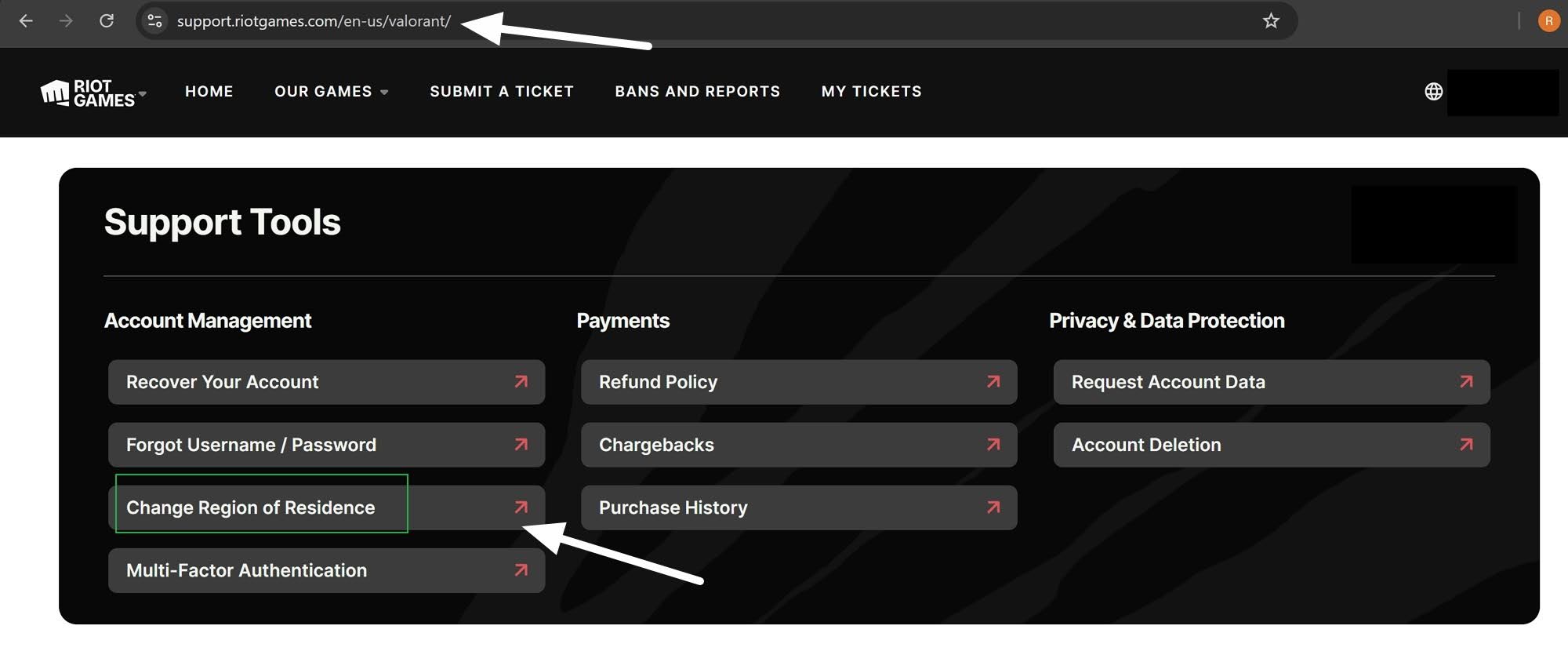

If the automated tool approves your request, follow the on-screen instructions to update your RoR. If the tool mistakenly rejects a legitimate region change, you will need to submit a ticket to request a manual account transfer.
In the ticket, explain that your RoR is wrong or that you have moved to a new country. Riot may request additional information before approving your request.
Can I fix Valorant region problems in Vietnam?
Yes. Riot has previously corrected regional account errors for players in Vietnam. Some accounts had the wrong location recorded, resulting in issues such as an empty Valorant store, incorrect currencies, and missing local payment methods. Riot said affected players could keep their progress, inventory, and access to the Asia-Pacific shard while updating their account location. This shows why it is worth contacting Riot Support if your Valorant region is genuinely wrong.
Can changing Valorant region wipe my 2XKO progress?
Yes. Riot expressly warns players that changing their RoR can cause them to lose their 2XKO progress. This does not affect your main Valorant progress, but because Riot’s fighting game uses the same Riot Games account system, a change of RoR can affect your 2XKO progress.
If you need to officially change your Valorant region because of an error or genuine country change, be sure to follow Riot’s advice and contact Riot directly to check whether the change can be handled without losing progress. 
Can I use a VPN to change Valorant region?
Yes, but only if you understand how Riot assigns accounts. Valorant does not work like some games where you can freely hop between account regions or shards whenever you want. Your account is tied to a Region of Residence (RoR), which affects matchmaking, available servers, store region, payment options, and who you can play with.
You can use a VPN to support an RoR request for an existing Riot Games account, or use a VPN to change your IP address before creating a new Valorant account with the RoR you want. Alternatively, you can use a VPN to improve routing to servers you can already access using Valorant’s Server Select feature.
Remember: You can’t use a VPN to unlock every shard or freely switch account regions on the fly. However, you may be able to use Valorant’s Server Select feature to test different available servers, and a VPN may help improve ping to the server you choose. This can help you avoid the same sweaty matchmaking pool when your default server feels too competitive, but it does not override your existing shard or RoR.
How to change Valorant region with a VPN
Below, I explain how to change your Valorant RoR with a VPN. Remember, you must be certain before submitting the request, because Riot applies a 90-day cooldown after a successful RoR transfer. You will not be able to change your region back until the cooldown period ends. Even then, repeated region-change requests could raise red flags with Riot Support and may put your account data or progress at risk.
Here are the steps needed to change Valorant region with a VPN:
- Pick a VPN that works with Valorant. I recommend NordVPN because it has fast servers, strong security features, and reliable apps for Windows. Surfshark is excellent if you want a lower-cost Valorant VPN, while Total VPN is ideal for anybody who wants a VPN bundled with antivirus protection.
- Create your VPN account. You can use the links in this guide to get the best available discount and a money-back guarantee. This lets you test a VPN with Valorant without risking your cash.
- Download the VPN app. The VPNs I recommend for Valorant have apps for all popular platforms. For Valorant, you will usually need to download the Windows app because the game is played on PC.
- Connect to a server in the region you want. Pick a VPN server in the country where you want your Valorant account to be based. For example, connect to a Turkish server if you want a Turkish account, or a US server if you want a North American account.
- Decide whether to change RoR or create a new account. If you want to keep your existing Valorant account, keep the VPN connected and use Riot’s Region of Residence tool to request a change. If you don’t want to risk your main account, keep the VPN connected and create a new Riot Games account instead.
- Open Valorant and check your region. Once your RoR has changed or your new account is ready, launch Valorant and check your matchmaking region, store currency, payment options, and available servers.
Note: If you change your Valorant RoR or create an account in another region, you may need to keep using your VPN each time you launch the game, especially when making purchases. This can help avoid conflicts between your account region and your current IP address.
Can I play on a different Valorant server by using a VPN?
Yes. Valorant has a Server Select feature that lets you choose from available servers when you are playing solo or as party leader. However, this does not let you change your account shard or Region of Residence (RoR).
A VPN can still help because it changes your IP address and the route your traffic takes to Valorant’s servers. This is why some Reddit users report connecting to VPN servers in places like Frankfurt, London, or Paris to improve ping when playing on EU servers.
This kind of Valorant location change is temporary and does not strictly require a VPN. You can select your server within the game. However, using a VPN alongside Valorant’s Server Select feature may improve routing and ping, helping you stay more competitive.
Should I connect to the VPN before launching Valorant?
If you are using a VPN for account-region consistency, account setup, or purchases, it is best to connect to the VPN before opening Valorant. This gives Riot and Valorant the same IP location from the start.
That said, some Valorant players report connection errors when the VPN is active during sign-in, including “server is down” messages or failed server detection. If this happens, you can try launching Valorant first, reaching the main menu, and then connecting to the VPN before joining a match.
This helps some players improve routing. I recommend testing a few VPN servers and sticking with the location that gives you the best ping without causing launch errors.
Can I use a VPN to purchase VP at a lower price?
Some users claim that they have saved money on Valorant Points (VP) by switching their account to Turkey. Players in Turkey pay less because Riot uses regional pricing based on local spending power.
To take advantage of lower regional prices in Turkey or elsewhere around the globe, your account region, VPN IP address, and payment method will need to line up. For example, to buy VP at Turkish prices, you will need a Turkish Valorant account, a Turkish IP address, and a Turkish-compatible payment method.
A VPN may help you maintain the right IP location when buying Valorant Points from a cheaper region. However, it will not unlock cheaper VP prices on its own if your account RoR and payment method do not match that region.
FAQs
Why change Valorant regions?
You may want to change Valorant regions to play with friends abroad, reduce long matchmaking times, or access a region that better matches your language or schedule.
Some players also change region after moving country, studying abroad, or creating their Riot account while travelling. In those cases, Riot’s Region of Residence tool can help correct the account.
Other players want cheaper Valorant Points, different lobbies, or a fresh start in another matchmaking pool. A VPN can help with these use cases, but you will usually need to change your RoR or create a new Riot account in the region you want.
Can I use a free VPN for Valorant?
No. Free VPNs are usually slow, congested, and oversubscribed. This can cause lag, connection errors, and unstable routing in Valorant. Free VPN IPs are also easier to spot because so many people use them. This makes them more likely to cause issues with your Riot account, especially when making a RoR request or buying Valorant Points.
Can a VPN help you avoid skill-based matchmaking in Valorant?
Yes. You can use Valorant’s Server Select feature to test different servers already available within your RoR shard. If your usual server feels too sweaty, you can switch to another available server to see whether that lobby feels easier.
Using a VPN will not help you find a different regional server inside the Server Select menu. However, it can help improve your ping to the server you choose. This can help make you more competitive.
Just remember that a VPN does not unlock every Valorant shard or override your Region of Residence (RoR). It helps you get the best performance from the Server Select options your account already has.
What is an MMR reset in Valorant?
An MMR reset means Valorant no longer treats your current rank or ranked progress as active in the same way after a region change. If Riot transfers your account to another RoR, your current ranked season progress may be erased, which means you may need to play placement matches again in the new region.
Can I change my Valorant name?
Yes. You can change your Valorant name by updating your Riot ID. Your Riot ID is the name other players see in Valorant, and it includes your display name plus a tagline.
To change it, log in to your Riot account, open the Riot ID section, and enter the new name and tagline you want to use. Riot lets you change your Riot ID for free, but you usually need to wait 90 days before changing it again.
Contents [hide]
- What are my options when changing Valorant region?
- How to change Valorant region officially
- Can I use a VPN to change Valorant region?
- How to change Valorant region with a VPN
- Can I play on a different Valorant server by using a VPN?
- Should I connect to the VPN before launching Valorant?
- Can I use a VPN to purchase VP at a lower price?
- FAQs
- Why change Valorant regions?
- Can I use a free VPN for Valorant?
- Can a VPN help you avoid skill-based matchmaking in Valorant?
- What is an MMR reset in Valorant?
- Can I change my Valorant name?