Want the best VPN for dark web browsing? The Tor Browser gives you anonymity by routing your traffic through multiple relays. However, local networks, ISPs, and government snoops can still detect that you are using Tor, and this can be enough to raise suspicions, particularly in countries where Tor usage is monitored or restricted. Using a VPN for the Dark Web hides your Tor access and conceals your home IP address from the Tor entry node, increasing your privacy considerably.
Keep reading to learn how to set up Tor with a VPN correctly, how to access the dark web safely, and which VPNs provide the right features for safe Tor browsing. I also explain why I don’t recommend opening .onion sites through normal browsers, even using Onion over VPN.
What are the best VPNs for the Dark Web?
A Dark Web VPN adds a necessary extra layer of privacy to the Tor Browser. That said, many VPNs suffer from leaks, poorly implemented encryption, or are missing important features that could put your Dark Web sessions at risk.
I tested more than 20 leading VPNs for privacy policy claims, leak protection, kill-switch reliability, and obfuscation options. Below you can see my top picks for safe Tor browsing.
Here is my shortlist of the best Dark Web VPNs:
- NordVPN: The best VPN for the Dark Web. Obfuscation, Double VPN, a system-level kill switch, and an independently audited no-logs policy. Fast, reliable, and easy to use with the official Tor Browser. 30-day money-back guarantee.
- Surfshark: Excellent value VPN for the Dark Web. With unlimited connections, RAM-only servers, obfuscation, Dynamic MultiHop, and a kill switch. Alternative ID is a useful privacy extra.
- Proton VPN: Advanced privacy. Secure Core, Stealth, open-source apps, and an audited no-logs policy.
- ExpressVPN: A fast, reliable VPN for Tor. Strong leak protection, an audited privacy setup, and Lightway to help reduce the slowdown from combining VPN and Tor.
- Private Internet Access: A highly configurable choice for experienced users. Open-source apps, a proven no-logs policy, SOCKS5 support, and plenty of advanced settings.
Want to know more? Check out my detailed provider reviews and the methodology section below to see how I tested and ranked these VPNs.
How to use a VPN for the Dark Web
Using a VPN for the Dark Web is easy, but you do need to get the connection order right since The Tor Project warns that combining Tor with a VPN can reduce anonymity if set up incorrectly. But don’t worry; just follow the steps below, and I’ll walk you through the process.
How to access the Dark Web safely with a VPN: step by step
- Pick a VPN that works reliably with Tor. NordVPN is my top recommendation because it combines obfuscation, a system-level kill switch, DNS leak protection, RAM-only servers, and an independently audited no-logs policy. Surfshark is a great option if you’re on a budget, and Proton VPN is perfect if you also intend to torrent and want port forwarding.
- Sign up for the VPN. The links in this guide have a discount code so you can get your chosen provider at the best price. You also get a 30-day money-back guarantee, so you can test the VPN or compare two services risk-free before committing long-term.
- Download and install the VPN app. My picks have apps for Windows, macOS, Android, iOS, and other popular platforms. Before connecting, make sure the kill switch and leak protection are enabled to prevent your Dark Web activity from leaking to your ISP if the VPN drops out.
- Connect to a standard VPN server. I recommend accessing Tor using a regular VPN server rather than a dedicated Tor over VPN server. This requires you to connect to the VPN first, and then launch the Tor Browser to navigate to .onion sites. Also, picking a nearby server will give you the best speeds. If your network blocks VPN traffic, enable the provider’s obfuscation feature before connecting.
- Launch the official Tor Browser. Your traffic will now travel through the VPN before entering the Tor network. Stick to Tor Browser rather than Chrome, Firefox, Edge, or another normal browser. Tor Browser includes anti-fingerprinting and other browser-level protections designed to improve anonymity.
- Navigate to the .onion site you want. You can now access the Dark Web without your ISP or local network seeing that your traffic is headed to a Tor entry node.
That’s it! Local networks, ISPs, and even government snoops will only be able to see that you are connecting to a VPN. They will no longer be able to tell that you are then routing your data into the Tor network to access Dark Web sites. The Tor entry node also sees the VPN server’s IP address rather than your home IP, which helps protect against compromised entry nodes or nodes controlled by the NSA.
Extra step for added anonymity
7. Reduce the information tied to your VPN account. If you use Tor, it’s safe to say that anonymity is important to you. So consider what information you hand over when creating a VPN account. Using your everyday email address or payment method is easier, but it also allows your VPN account to be tied to your identity. You can reduce this unnecessary connection by signing up using a burner email, a pseudonym, and a cryptocurrency payment. This reduces the data held by the VPN that might be used in an attempt to correlate activity to you during a targeted attack.
You could even sign up on public Wi-Fi to ensure your home IP address isn’t associated with the account at the time of purchase. Just keep in mind that cryptocurrency payments aren’t automatically anonymous, so you will need to consider how you acquired the coins.
Best VPNs for the Dark Web: My top picks
After testing more than 20 leading providers, these are my top VPNs for the Dark Web and anybody who wants to use Tor with greater privacy. Each VPN differs slightly, but they all offer the privacy features needed to connect to the Tor network without exposing your activity to local networks and ISPs.
1. NordVPN
NordVPN is my top recommended VPN for the Dark Web. It combines a strong, independently audited privacy policy with features that genuinely make Dark Web access safer. Best of all? This VPN is affordable despite also being reliable for unblocking streaming services and torrenting securely.
NordVPN starts at just $3.49 per month, but it comes packed with security features: obfuscated servers, Double VPN (multi-hop VPN), a system-level kill switch, DNS leak protection, and RAM-only servers. This mix is ideal for users who want to access the Dark Web without their ISP knowing.
My reading of NordVPN’s privacy policy revealed that temporary connection timestamps remain in RAM for up to 15 minutes after a session ends:
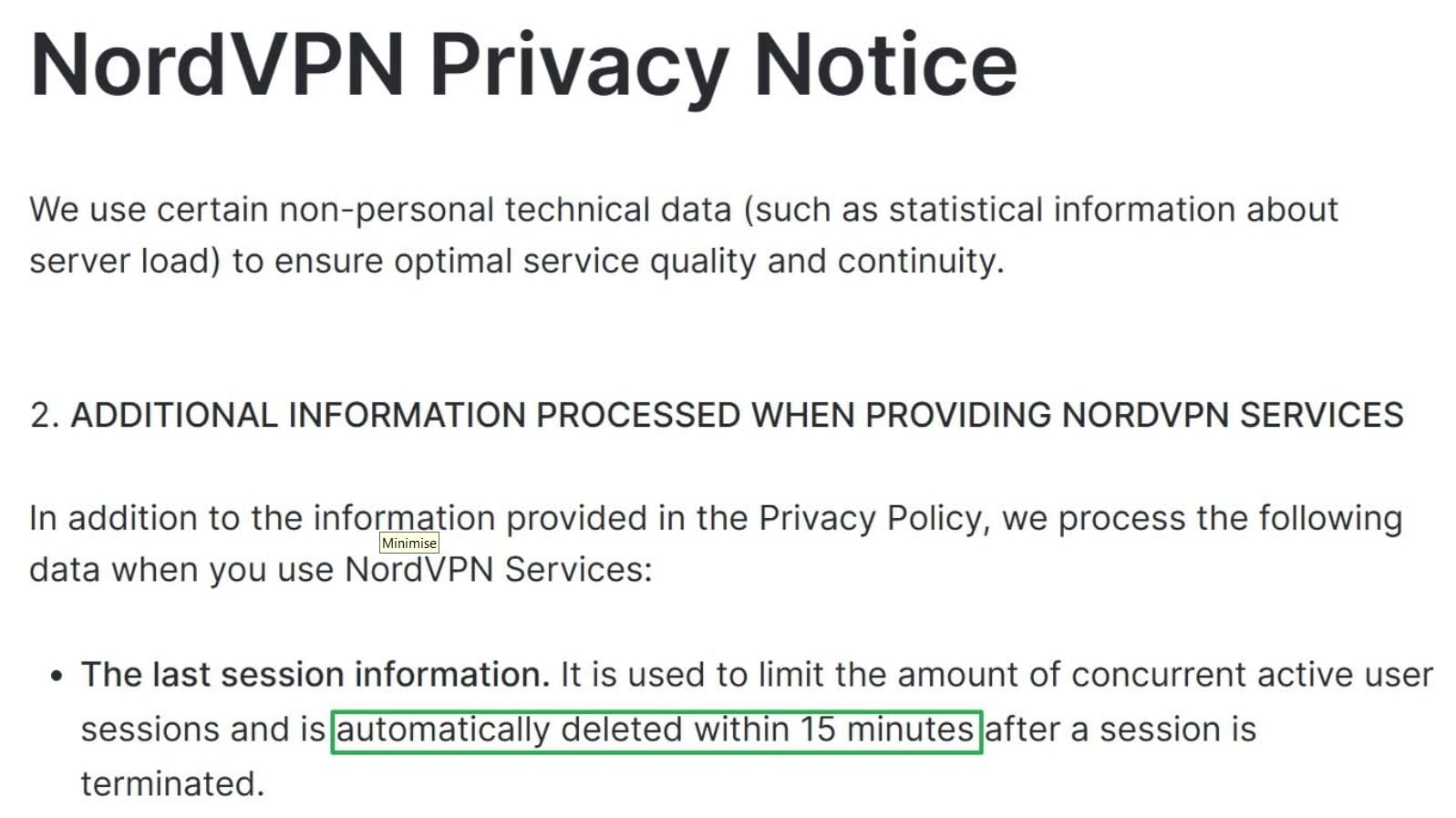
My research revealed that many reviewers criticize this part of the policy, but I see the specificity as a positive rather than a weakness. Think about it: every VPN provider must process enough live connection information to operate the service. Other VPN privacy policies regularly use vague language that says all session data is deleted at the end of a VPN session. But this actually creates a grey area: when? NordVPN clearly states that temporary session data is not written to permanent logs and that connection timestamps are removed within 15 minutes. This specificity ensures greater transparency, not less.
NordVPN’s apps, infrastructure, and privacy policy have also undergone independent audits and been found consistent with genuine no-logging practices. This puts NordVPN in an exclusive cluster of VPNs that have proven their privacy claims.
NordVPN offers dedicated Onion over VPN servers, which are often touted as a major reason for its inclusion in best VPN for Tor lists.
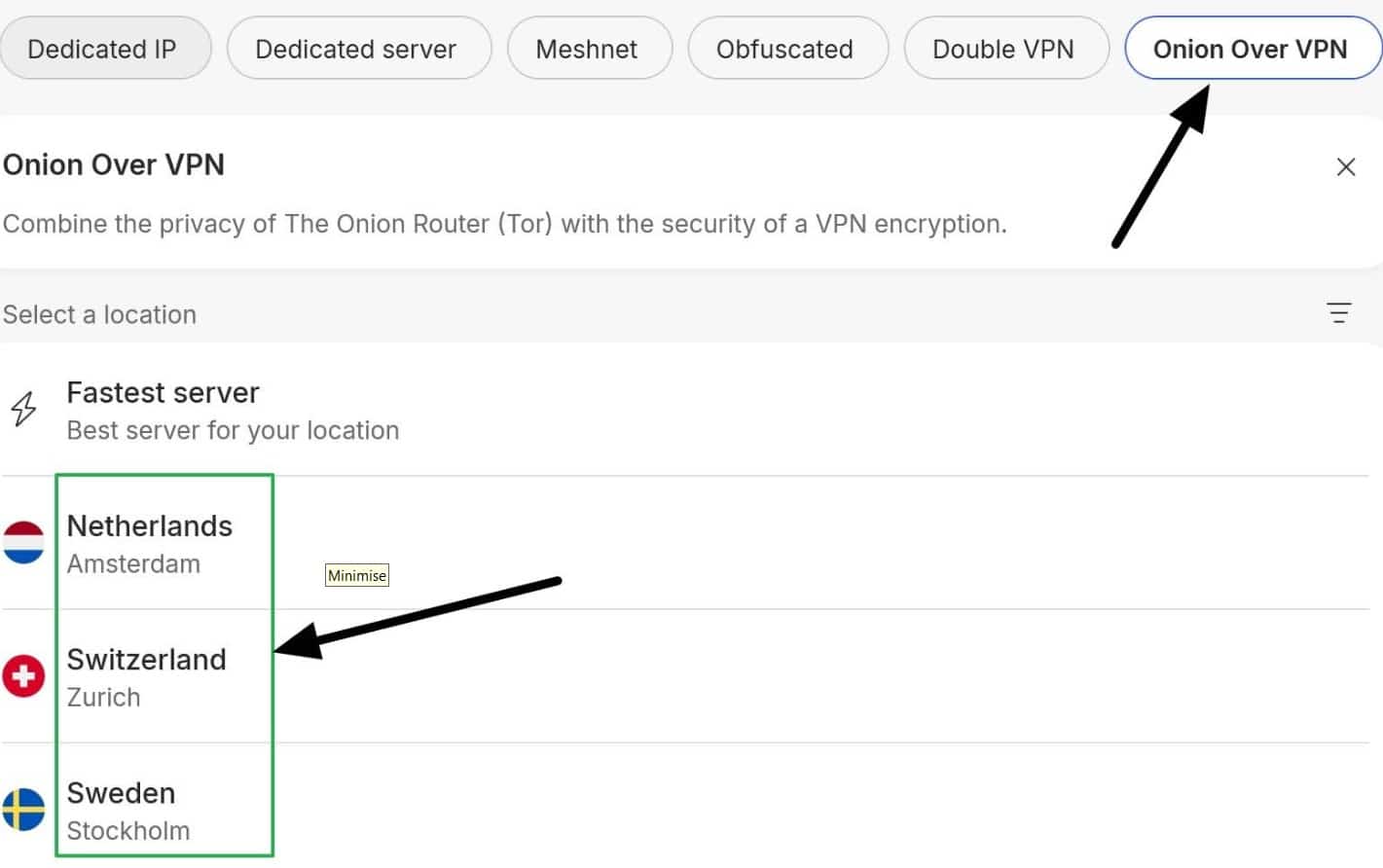
These servers automatically route your VPN traffic into the Tor network and can even access Dark Web URLs through a normal browser like Chrome, Firefox, or Edge. I recommend against this because normal browsers fail to implement the anti-fingerprinting and other browser-level protections you get in Tor Browser.
To establish private Dark Web sessions, I recommend connecting to a standard NordVPN server and then launching the official Tor Browser. This hides your home IP address from the Tor entry node while preventing your ISP or local network from seeing you access the Dark Web.
For those wondering: you can launch Tor Browser while connected to Onion over VPN, but this effectively stacks Tor on top of Tor. This will make Tor even slower with no obvious privacy benefit.
Speaking of speeds, NordVPN is fast, but that doesn’t mean it can make Tor faster. Its Tier-1 servers and NordLynx protocol help reduce additional VPN slowdown compared to slower competitors, but a VPN still introduces some additional lag.
NordVPN allows torrenting on its standard servers, and during my tests I could access international streaming services like Netflix, Hulu, BBC iPlayer, Paramount+, and Max. You can use it on up to 10 devices simultaneously, and it has 24/7 live chat support and a 30-day money-back guarantee to test it risk-free.
Pros:
- Excellent privacy policy with multiple independent audits
- Obfuscation, Double VPN, kill switch, and RAM-only servers
- Fast NordLynx protocol and Tier 1 servers
- Works to access popular streaming services globally
- Allows torrenting
- Onion over VPN is available for users who understand the trade-offs
Cons:
- Onion over VPN is convenient, but I don’t recommend using it with a normal browser like Chrome to access the Dark Web
BEST VPN FOR TOR:NordVPN is my top VPN pick. It offers the best combination of privacy, security, speed, and value for money. It is also an incredible all-rounder that you can use to protect all your activities and defend against hackers on public wifi. Works with Netflix US and has a no-quibbles 30-day trial period.
2. Surfshark
Surfshark is my favorite budget VPN for a wide range of uses, including private access to the Dark Web. The VPN starts at just $2.49 for a plan that gives you access to all the important VPN features and server locations. This makes it a reliable option for Dark Web privacy, but it is also extremely versatile.
The VPN allows unlimited connections, so you can share your subscription with friends and family, making you extra popular at family get-togethers or on a group vacation. It also makes it a good VPN for friends at school to pile in on to gain privacy and bypass blocks in school dorms or on campus.
Despite being excellent value for money, Surfshark still provides strong online privacy, regardless of which plan you choose. You also get Camouflage Mode for obfuscation, NoBorders for restrictive networks, a system-level kill switch, and DNS leak protection. Its no-logs policy has also been independently audited, and RAM-only servers help ensure user data is not stored permanently.
The only small downside is that Surfshark moved its headquarters from the British Virgin Islands to the Netherlands. This puts it in a jurisdiction that some privacy purists may view as less desirable because it participates in intelligence-sharing alliances. However, all things considered, the Netherlands is still a strong jurisdiction, especially when backed by an audited no-logs policy and diskless servers.
I tested Surfshark’s kill switch by deliberately crashing the app, and was happy to find that the Windows implementation was system-level. This is important when accessing the Dark Web because a dropped VPN connection will expose your direct Tor connection to your ISP, and your home IP address to the Tor entry node: both of which cause privacy risks.
My favorite thing about Surfshark is that it is a workhorse. It is fast, has a wide choice of servers, allows torrenting, and streaming access is fantastic: Netflix US, Hulu, Max, Paramount+, BBC iPlayer, 9Now, ARD Mediathek, France.tv, Globo Play, and U-NEXT all worked in my tests.
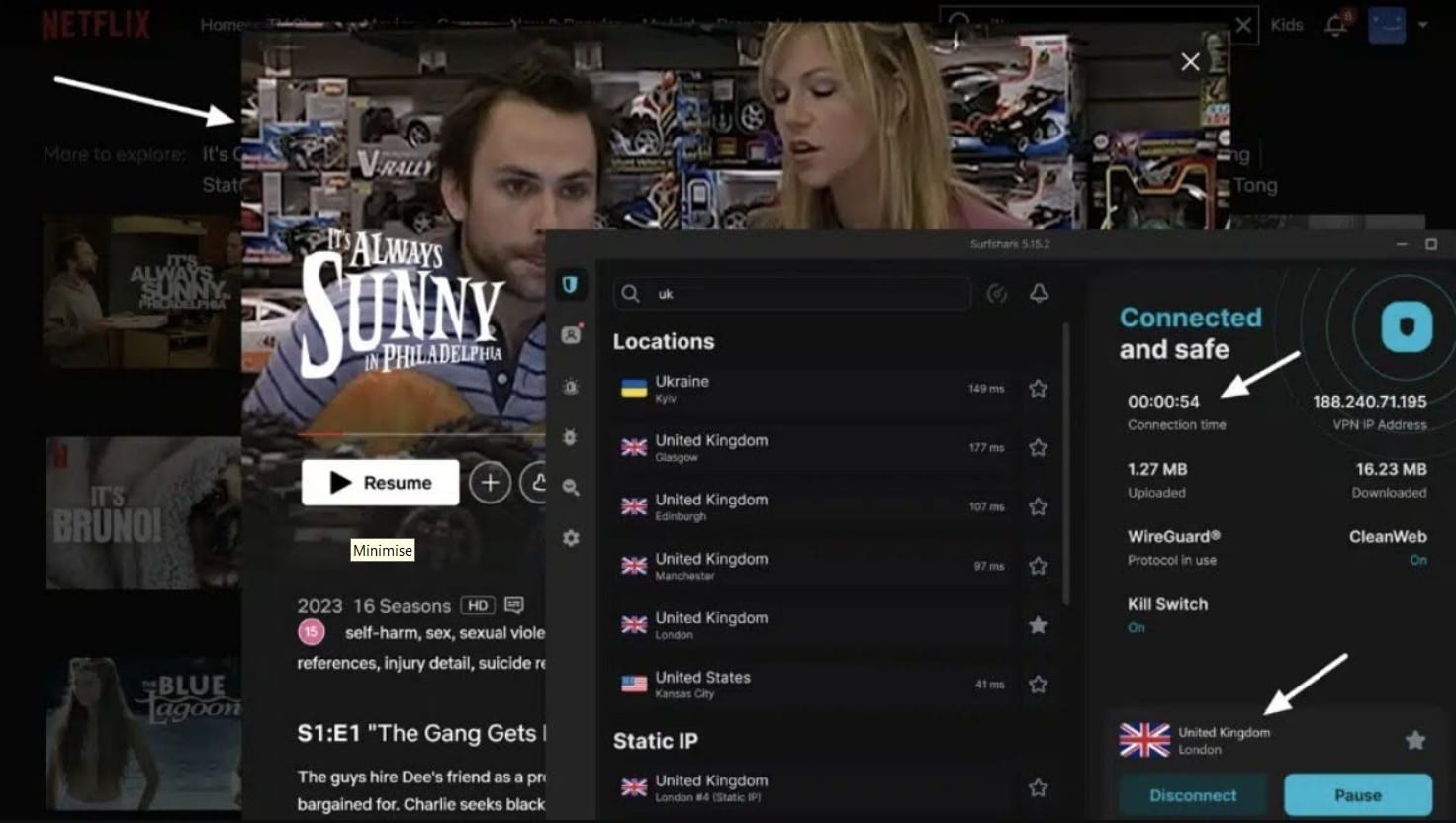
Surfshark worked to stream Netflix exclusives from the US, UK, France, Italy, Germany, and Japan libraries during my tests.
This makes it a strong all-round VPN whether you are at home using Tor, on vacation trying to stream Netflix, or bypassing social media blocks at work.
Just remember that Surfshark does not offer port forwarding. However, for most users who simply want a trustworthy, affordable VPN before opening Tor Browser, it is very hard to beat on a budget, especially if you want a VPN that is also good for the rest of your family.
Pros:
- Unlimited connections
- Audited no-logs policy
- RAM-only servers
- Obfuscation and NoBorders mode
- System-level kill switch
- Excellent streaming access
Cons:
- No port forwarding or dedicated Tor over VPN servers
BEST BUDGET VPN FOR DARK WEB:Surfshark is a versatile VPN that is perfect for families. Allows unlimited connections and works to unblock streaming sites, social media, and other regional services. The encryption and privacy features are reliable for hiding Tor access and using public wifi safely. Decent upgrades available for antivirus, private search, data breach alerts, and other extras. 30-day money-back guarantee.
3. Proton VPN

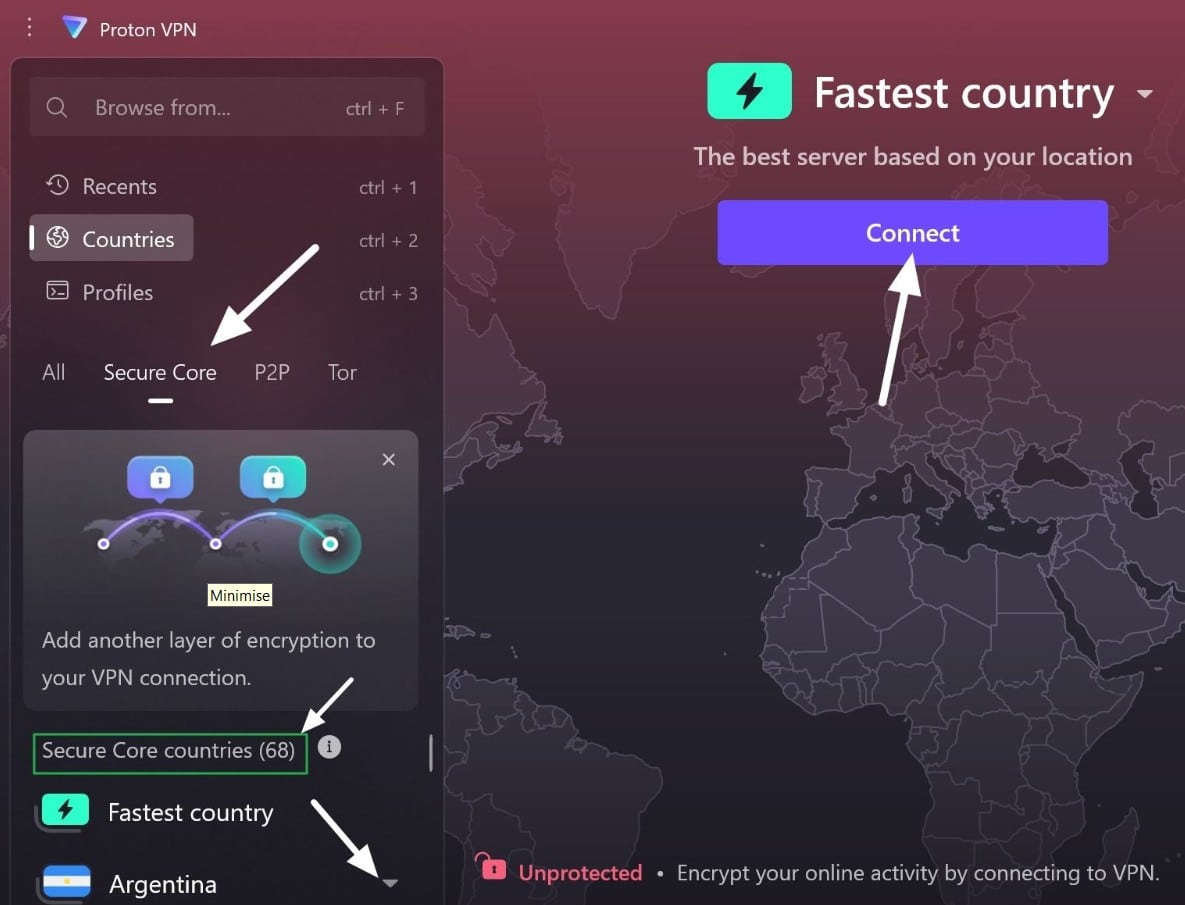
Proton VPN is my top choice for Dark Web access that requires the highest levels of privacy. You get open-source apps, an independently audited no-logs policy, a custom Stealth protocol for obfuscation, a fully tested system-level kill switch, and Secure Core servers that route your traffic through hardened infrastructure to reduce the effectiveness of correlation attacks.
Secure Core is highly effective and well worth considering if you intend to use the Dark Web for sensitive work such as whistleblowing on portals like SecureDrop. That said, not everybody using Tor needs this level of protection, and connecting to Secure Core will slow you down more than a regular one-hop VPN connection.
If you use the Dark Web to access Facebook in China or other restricted countries, play chess on a Dark Web forum, read censored news, or access a .onion book club, a regular VPN server is enough to hide your Tor connection from your ISP and local network. These activities are not sensitive per se, but Tor’s reputation can still raise suspicions you may prefer to avoid.
In terms of speeds, Proton performed extremely well. My tests across its New York, London, and Hong Kong servers resulted in an average speed drop of 20.87%. I achieved this result using the WireGuard protocol and a single hop (no Secure Core). Speeds were fast enough for 4K streaming, playing games, and other data-intensive tasks.
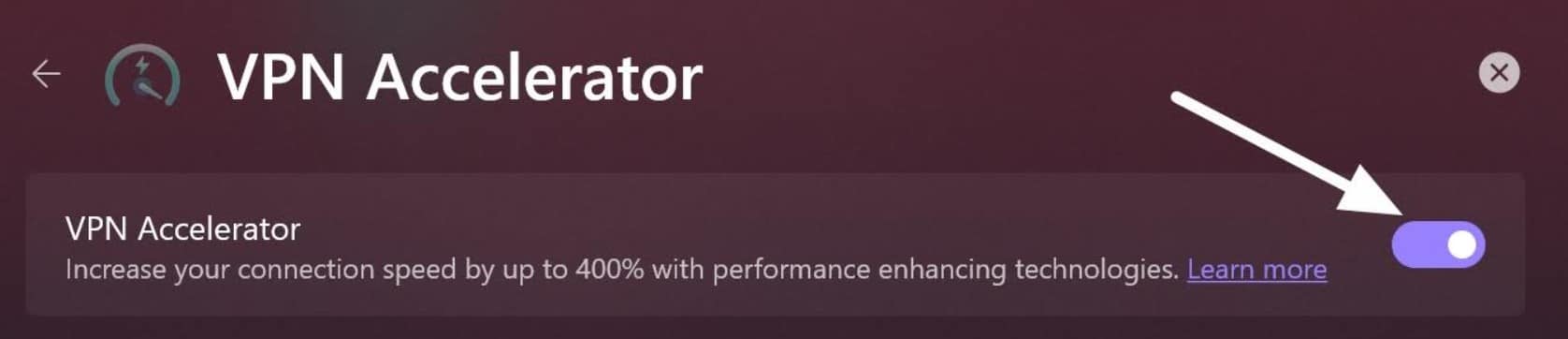
I also tested Proton’s VPN Accelerator on my home broadband rather than our dedicated test server in Ohio, but I didn’t notice an improvement. Worth enabling if you want the best speeds, but don’t expect it to blow your socks off.
Stealth helps you get connected on restrictive networks, while port forwarding makes Proton the best Dark Web VPN for people who also intend to torrent regularly. You also get split tunneling. Finally, it worked to stream Netflix US, Hulu, Max, and BBC iPlayer in my tests, so it is a rock-solid option for streaming on vacation.
Overall, Proton is an excellent choice for journalists, whistleblowers, and anybody bypassing censorship in countries where doing so could land them in hot water. Although it used to offer dedicated Tor over VPN servers, it has decided to deprecate these. I see this as a positive because using standard VPN servers alongside Tor Browser is safer than accessing the Dark Web through a regular browser like Chrome.
Pros:
- Secure Core servers for sensitive tasks
- Servers in 100+ countries
- Stealth protocol for restrictive networks
- Port forwarding
- Split tunneling
- Works with popular streaming platforms around the globe
Cons:
- Secure Core adds noticeable extra slowdown
- VPN Accelerator made little difference in my tests (308 vs 317 Mbps)
BEST VPN FOR EXTRA SECURITY:Proton VPN is my top pick for journalists, whistleblowers, political activists, and other sensitive Dark Web use cases that require the highest levels of privacy. It offers great speeds, a wide choice of servers, and many advanced privacy features. It is also great value for money now that it has reduced its starting cost to $3.49 per month. Comes with a 30-day money-back guarantee.
4. ExpressVPN

ExpressVPN is a service that has been cementing its reputation as a privacy-enabling technology since 2009. It is one of my favorite premium VPNs for Tor because of its custom apps, far-reaching server infrastructure, and a no-logs policy that has undergone numerous independent audits. The network also runs on TrustedServer tech, which is Express’ name for diskless servers that run exclusively in RAM.
One of the most positive aspects of ExpressVPN in 2026 is that it has become more affordable. ExpressVPN now starts at just $2.99 per month, for a plan that gives you all the premium VPN features you’d expect: OpenVPN with automatic obfuscation, a kill switch, split tunneling, RAM-only servers, and the ExpressVPN Lightway protocol with Turbo for better speeds. Basic plan subscribers therefore get all the privacy features needed for safe Tor browsing.
This makes it highly competitive compared to previous years: you get the same core VPN plan that kept netizens coming back for over 15 years, but at a much cheaper rate.
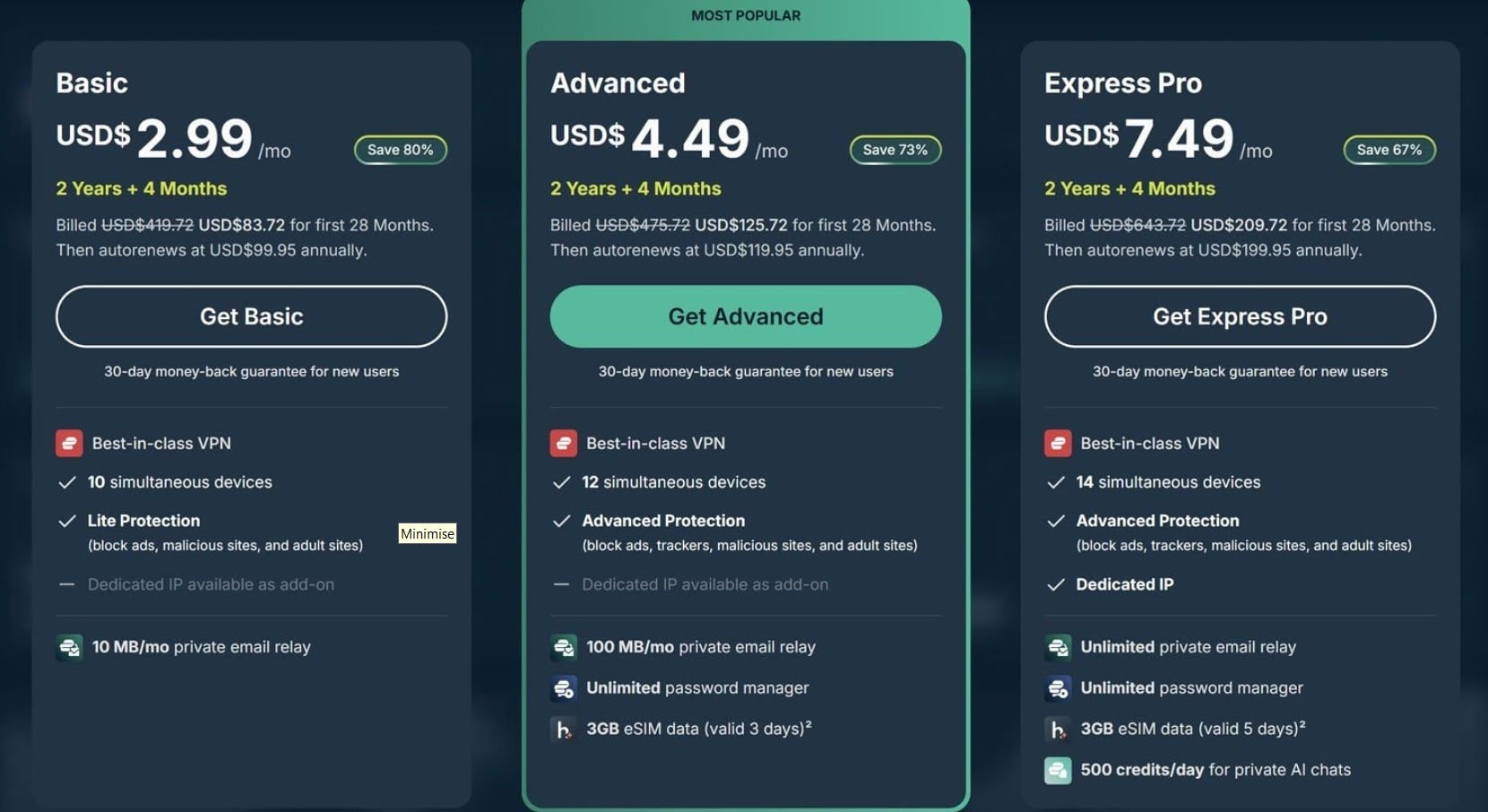
Users can upgrade to Express Pro for $7.49 per month. The extra $4.50 per month gets you 14 simultaneous connections instead of 10, a dedicated IP (you can choose where you want your IP from a list of 22 countries), unlimited ExpressKeys password management, full ExpressMailGuard email aliases, and ExpressVPN’s new private AI chatbot service, which uses secure enclaves to let you ask AI questions that cannot be tied back to your identity by ExpressVPN or the model provider.
Users in America also receive Identity Defender with up to $5 million in identity-theft insurance. I found this to be a fairly priced upgrade, especially for users who need an IP address that is reserved for their use only.
ExpressVPN was also extremely fast. It slowed me down by an average of just 7% across the server locations I tested (New York, London, and Hong Kong). This won’t speed up Tor, but it will ensure that you don’t experience too much additional latency when accessing the Dark Web with an extra layer of privacy.
If you are on a restrictive network, such as a workplace that is preventing your VPN from connecting, ExpressVPN can automatically obfuscate the connection on supported platforms. This means you won’t need to fiddle with other settings in the menu.
As with my other recommendations, I chose ExpressVPN for its all-around value. In addition to being a solid no-logs VPN with strong encryption, it works to access international streams, allows torrenting, and works to make private VoIP calls. Just bear in mind that there is no port forwarding, so Proton remains the better pick for seeding torrents.
Pros:
- Long-standing privacy record and repeated independent audits
- TrustedServer RAM-only infrastructure
- Automatic obfuscation on restrictive networks
- Excellent speeds in my tests
- Works with popular streaming platforms
- Dedicated IP available on Pro
Cons:
- No port forwarding
- Pro costs $4.50 more per month than Basic
FAST PREMIUM VPN FOR TOR:ExpressVPN is a strong all-rounder. It offers great value on its Basic plan, with optional upgrades if you need them. The Basic plan has everything you need to access the Dark Web without being tracked by local networks or ISPs. You don’t get dedicated Tor over VPN servers, but I generally recommend against using Tor in a regular browser anyway. 30-day money-back guarantee.
5. Private Internet Access
Private Internet Access is a provider that is known for its customization options. You can tweak the encryption based on whether you want stronger privacy or faster speeds. It also has an excellent no-logging policy that has been independently audited and proven in US courts on multiple occasions. The VPN was subjected to government data requests it could not comply with on both occasions.
The trade-off is that PIA is based in the US, which may put some privacy-conscious users off right out of the gate. This creates a risk of warrants and gag orders, which is why the VPN publishes regular transparency reports showing how many requests it receives and whether any logs were produced.
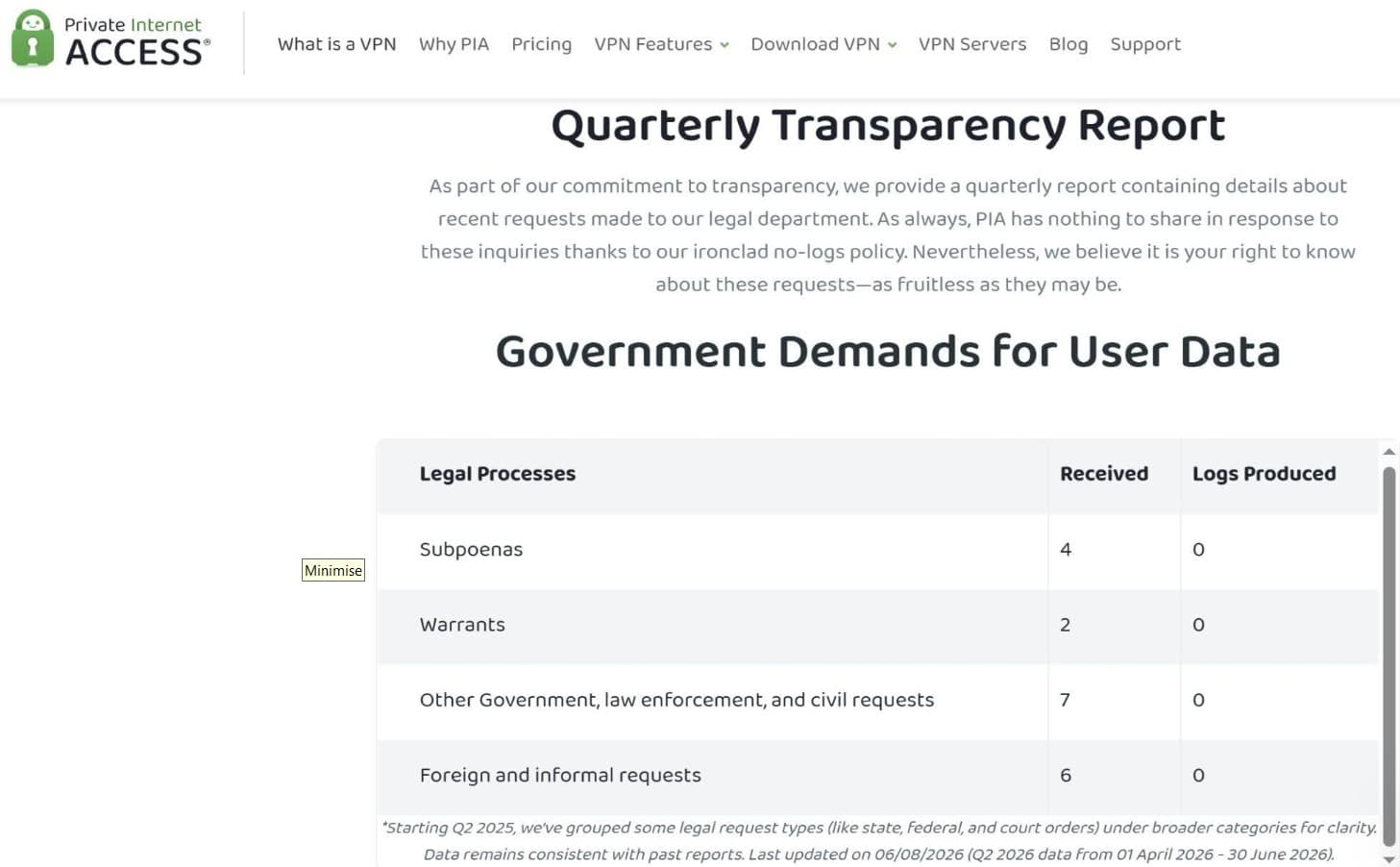
All things considered, this VPN is superb, but past proof is not a guarantee of future performance or protection against gag orders and the potential for forced logging in secret. This is why the US jurisdiction is still worth considering, particularly when engaging in sensitive tasks.
In terms of features, PIA gives you open-source apps, RAM-only servers, WireGuard and OpenVPN, a kill switch, split tunneling, port forwarding, and servers that work for both torrenting and streaming. Just bear in mind that it wasn’t as good for accessing streams on vacation as my top picks.
Pros:
- No-logs claims proven in real-world legal cases
- Independently audited infrastructure
- Open-source apps and RAM-only servers
- Port forwarding and split tunneling
- Highly customizable
- Allows unlimited simultaneous connections
Cons:
- Based in the US
- Not as strong for bypassing streaming blocks
- Port forwarding is not available for US server locations
PROVEN NO-LOGS POLICY:PIA has proven its no-logs policy in court, and it maintains transparency reports to let you know if the US government serves it any data requests or warrants. Strong privacy tools make it a solid choice for accessing the Dark Web.
Methodology: How I tested and ranked the best VPNs for the Dark Web
I tested more than 20 leading VPNs to pinpoint those that have the best features for Dark Web users. My method ranks each Dark Web VPN based on what consumers actually want and need, using consistent criteria and direct metrics, rather than relying on provider claims or personal preference.
These are the main things I looked for when ranking VPNs for Tor:
- Privacy and no-logs claims. I read each privacy policy, checked independent audits, reviewed provider jurisdiction, and checked whether no-logs claims had ever survived government data requests.
- Kill switch and leak protection. I tested the VPN kill switch, including deliberately crashing apps to check whether it applies at the system level or is app-only. I also checked for IP and DNS leak failures that could expose Tor access.
- Obfuscation. This privacy feature helps you connect on restrictive networks without disclosing VPN use to ISPs. It also helps you access Tor in countries where VPNs or Tor are blocked.
- Server infrastructure. I looked for providers with a wide choice of servers to give you more access options. I also prioritized RAM-only servers, hardened locations, and infrastructure advancements that help protect you, such as the post-quantum encryption offered by Nord and Express.
- Advanced privacy features. I checked that each VPN was fully featured in its basic VPN plan, with extra points for multi-hop VPN options such as Double VPN and Secure Core. Upgraded plans were only considered a bonus if they added genuinely useful extras rather than locking essential VPN privacy features behind a more costly tier.
- Tor compatibility. I checked how well each VPN works with Tor Browser and whether the provider offers specialist Tor features. Tor over VPN servers were not directly preferred or penalized, because I recommend using standard VPN servers alongside Tor Browser to prevent fingerprinting and other pitfalls.
- Speed and stability. Tor is already slow, and adding a VPN for extra privacy will introduce additional latency. I tested each VPN to find services that offer excellent reliability for data-intensive tasks, while ensuring that Tor doesn’t come to a grinding halt when you stack a VPN on top to prevent ISP tracking.
- Torrenting, streaming, and everyday use. I checked P2P support, port forwarding, split tunneling, streaming access, and other features that make the VPN useful for day-to-day activities. I also checked connection allowances to see how suitable each VPN is for families.
- Price and overall value. I compared performance and privacy features against subscription cost, connection limits, free trials, and money-back guarantees to find affordable Dark Web VPN options that offer premium features at a fair price point.
Want to know more about my testing and ranking process? Check out our detailed methodology article.
Can I get a cheap dark web VPN?
Yes. Just because you want a VPN that has robust privacy features and servers that work to join the Tor network does not mean you have to pay through the nose. The VPN industry is saturated with competitors vying for your money, which keeps prices competitive. However, cost doesn’t always reflect the value or quality of the features you get.
Many low-cost VPNs lack the privacy features needed to stop ISPs and local networks from tracking your activities. I have also reviewed expensive VPNs that lack these features or suffer from leaks and flaws.
The good news? Plenty of high-quality VPN providers offer a quality service at a fair price. Every VPN in this list was recommended because it offers the privacy features you need at a cost that makes it good value.
Free dark web VPN: Why you might be paying with your privacy
You are welcome to try a free VPN to access the Dark Web, but you must pick very carefully. A CSIRO study from 2016 revealed that many free VPNs on popular app stores like Google Play suffer from leaks and hide tracking libraries in their apps. If you use this type of VPN to access Tor, local networks and ISPs could still detect your Tor usage. In addition, the Tor entry node could see your real home IP address. This not only nullifies the reasons for using a VPN, but actually gives you a false sense of security despite the fact that it is harming your privacy.
To make things worse, many free VPNs monitor you for profiling purposes and sell your browsing habits to data brokers. That means using a free VPN could expose your use of Tor rather than hide it. The whole point of adding a VPN to Tor is to increase privacy, not to send your data to a company that promises to monitor and sell your data.
Which free VPNs are safe for Tor?
If you can’t afford a premium VPN, there is some good news. A few premium providers offer the same encryption and essential privacy features (such as a kill switch) as the paid plans. For example, Proton VPN, Windscribe, TunnelBear, and Hotspot Shield all offer free tiers you can trust for privacy.
The caveat is that these free plans usually offer fewer server locations, slower speeds, or fewer advanced privacy features. Some also impose monthly usage limits. And features like multi-hop and specialist Tor servers usually only become available if you pay. The same is true of access to streaming platforms, which is usually reserved for paying subscribers in order to encourage upgrades.
For basic Tor browsing, a reputable free dark web VPN can be enough, but be warned: choose the wrong VPN, and you could expose your Tor usage rather than protect it. If you have an elevated threat model, or you need to bypass censorship, I would move to a paid VPN as soon as possible.
When is it safe to use Onion over VPN in a regular browser?
I recommend never accessing the Tor network through a regular browser, and this is the Tor Project’s official recommendation as well. Regular browsers such as Chrome, Firefox, and Edge are not designed to prevent fingerprinting, isolate browsing activity, or provide the anti-tracking protections built into Tor Browser. The Tor Browser is specially hardened to reduce these risks, helping you benefit from the privacy protections provided by the Tor network.
So, why do some VPNs offer Tor over VPN servers? These can be useful for accessing the Dark Web on devices that won’t let you install Tor directly, such as smart TVs or consoles. However, due to the privacy concerns they create, I would never recommend using Tor in a regular browser for sensitive activities. If you are doing low-risk activities, such as accessing a book group, the risks may be less significant. However, even accessing restricted news could be risky if you use Tor in a normal browser.
Should I use a VPN after the Tor exit node?
No. When you use a VPN, you are putting your trust in that provider, its privacy policy, and its ability to run its service the way it claims. The VPNs I recommend have a proven track record, strong no-logs policies, and both apps and infrastructure that have been audited by independent security and penetration testing companies. This makes them secure, but it does not necessarily guarantee future success.
Adding a VPN following the Tor exit node (known as VPN over Tor) can hide the Tor exit node’s IP address from the website you visit, but this is largely unnecessary because the exit node cannot be tied back to your home IP due to the hops in the Tor network.
The drawbacks are far more substantial. Your ISP can still see that you are using Tor because the VPN connection comes after the Tor network. When you use a VPN after Tor, your VPN provider can see traffic leaving the Tor network. And if the VPN were compromised by hackers or raided by authorities, they could potentially monitor that traffic in real time, even if the VPN is set up not to store logs once the session ends.
What’s more, using the same VPN IP across different Tor circuits can theoretically create a method for linking sessions together through correlation attacks. In addition, VPN over Tor may cause .onion access to break, making the setup inefficient unless it is configured properly.
For most users, I recommend Tor over VPN instead. Connect to the VPN first and then open the official Tor Browser. This hides your home IP address from the Tor entry node while preventing your ISP or local network from seeing that you are accessing the Dark Web.
Do I need a VPN to stay anonymous online?
The Tor Network is designed to make you anonymous online by encrypting your traffic and routing it through a network of volunteer nodes that help to separate your activities from your IP address in such a way that they can’t easily be reconnected. This gives you privacy and allows you to gain access to private forums and websites on the Dark Web.
The problem with the Dark Web is that it has a reputation for criminality. Dark Web marketplaces such as Russian Market, Brian’s Club, STYX Market, WeTheNorth, TorZon Market, Exodus Marketplace, and Vortex Market have a reputation for providing access to illicit goods, drugs, weapons, stolen data, and criminal services. Needless to say, this creates a lot of attention from the police and government agencies, which is why Tor access is likely to be one of the things tracked and monitored through ISP metadata collection.
While Tor is designed to prevent anybody from tracking your activities or web visits (on the surface or deep web), it cannot, of itself, prevent your ISP from seeing that you are entering the Tor network. Due to the nature of Tor, many people choose to prevent local networks, ISPs, and other third-party eavesdroppers from detecting their Tor use. This creates an added layer of privacy.
A VPN also hides your home IP address from the Tor entry node, which means that no Tor relay ever sees the address for your home network. This increases your privacy further by preventing the entry relay from keeping tabs on your real IP address.
Best VPNs for Dark Web: FAQs
Can I access the Dark Web without a VPN?
Yes. Tor lets you access the Dark Web without a VPN. However, your ISP can still see that you are connecting to Tor, and the Tor entry node can see your home IP address. Using a VPN before Tor adds another layer of privacy by hiding both.
Can I get into trouble for using the Dark Web?
Accessing the Dark Web is not automatically illegal. Instead, it is what you choose to do on the Dark Web that could break the law. The Dark Web has a reputation for criminality because marketplaces sell drugs, stolen data, weapons, and other illicit goods. Other serious crimes also take place on the Dark Web, including the distribution of child sexual abuse material and murder-for-hire schemes.
Due to the serious nature of the crimes committed on the Dark Web, it should come as no surprise that leaked XKeyscore material published in 2014 revealed that the NSA monitored people accessing Tor-related services and websites. This is why many people choose to conceal Tor access using a VPN.
Simply using Tor or visiting the Dark Web is not illegal. Problems only arise when you use it to carry out illegal activities. That said, you should access the Dark Web responsibly and with great care. Avoid suspicious .onion links and websites that could expose you to illegal content or services.
What is a Tor guard node?
A Tor guard node is the first relay your device connects to when entering the Tor network. It can see your IP address, but not the websites you visit. Using a VPN before Tor means the guard node sees the VPN server’s IP address instead.
Are VPNs legal?
VPNs are legal in most countries. However, using a VPN does not make illegal activity legal or protect you from the consequences of breaking the law. I recommend checking local laws regarding VPN and Tor use so that you understand the legal situation where you live. Nothing in this guide should be taken as legal advice. Using a VPN or Tor is always at your own risk.
Can I make an anonymous VPN payment?
Most people pay for a VPN using a regular debit or credit card, which links the payment to their identity. The good news is that many premium VPNs, including some of the services I recommend, accept cryptocurrency.
Paying with Bitcoin can reduce the personal information attached to your VPN subscription, particularly if you also use a burner email address. However, Bitcoin is pseudonymous rather than completely anonymous, and transactions can sometimes be traced back to you, particularly if you bought your cryptocurrency through a KYC exchange. This makes it important to understand privacy techniques such as coin mixing, as well as how you acquire and store your cryptocurrency for added privacy.
You can also sign up using public wifi or another connection that is not linked to your home IP address. This adds another layer of privacy, but remember that truly anonymous payment depends on both the payment method and the personal information you provide when creating the account.
Contents [hide]
- What are the best VPNs for the Dark Web?
- How to use a VPN for the Dark Web
- Best VPNs for the Dark Web: My top picks
- 1. NordVPN
- 2. Surfshark
- 3. Proton VPN
- 4. ExpressVPN
- 5. Private Internet Access
- Methodology: How I tested and ranked the best VPNs for the Dark Web
- Can I get a cheap dark web VPN?
- Free dark web VPN: Why you might be paying with your privacy
- When is it safe to use Onion over VPN in a regular browser?
- Should I use a VPN after the Tor exit node?
- Do I need a VPN to stay anonymous online?
- Best VPNs for Dark Web: FAQs
- Can I access the Dark Web without a VPN?
- Can I get into trouble for using the Dark Web?
- What is a Tor guard node?
- Are VPNs legal?
- Can I make an anonymous VPN payment?